200 AutoCAD Commands and Shortcut list [With PDF eBook]
In this massive list of 200 AutoCAD commands, I have tried to include some of the most useful commands, Keyboard Shortcuts and Tools which every AutoCAD user must know. Some of the commands in this list are very basic which are used very frequently and also there are commands and tools which are not often [ ]
In this massive list of 200 AutoCAD commands, I have tried to include some of the most useful commands, Keyboard Shortcuts and Tools which every AutoCAD user must know.
Some of the commands in this list are very basic which are used very frequently and also there are commands and tools which are not often used despite their great features.
So, lets get started with the most basic thing, AutoCAD keyboard shortcuts.
Keyboard Shortcut Keys
Keyboard shortcuts or hotkeys are the shortest and quickest way of activating some of the common AutoCAD operations or commands.
In this list, I have included some of the most frequently used and useful keyboard shortcuts
Ctrl + N
You can use this shortcut to open a new drawing tab in AutoCAD.
Ctrl + S
You can use this keyboard shortcut to save a drawing file.
Ctrl + Shift + S
You can use this keyboard shortcut to save the drawing as a new file, in short, this is the hotkey for “save as” command.
Ctrl + 0
Clears screen to show only the drawing area and hides palettes and tabs. Press it again to reset the default AutoCAD interface.
Ctrl + 1
Select an object and press Ctrl + 1 to open the properties palette which lists the properties of the object.
You can use this palette to modify most of the properties of the object too. You can also use the PR command to open the property palette.
Ctrl + 2
You can use it to open the design center palette which contains many AutoCAD blocks that can be used directly in your drawing.
Ctrl + 8
You can use this to open a quick calculator inside the AutoCAD user interface to perform simple and complex calculations using the scientific calculator and also for unit conversion calculations.
Ctrl + 9
You can use this keyboard shortcut to toggle the visibility of the command line.
If for some reason your command line is hidden from the drawing area, then use this keyboard shortcut to bring it back.

Ctrl + C
Select objects from the drawing area and press Ctrl + C to copy to objects to the clipboard.
Ctrl + V
To paste the copied objects of the clipboard into the drawing keeping their original properties, you can use this keyboard shortcut.
Ctrl + Shift + V
To paste the copied objects as a block you can use this keyboard shortcut, the block thus created will have a random set of characters as is name.
You can use this keyboard shortcut to make blocks quickly without going through the create block window.
Ctrl + Z
This keyboard shortcut can be used to undo the last action in your drawing. You can press this shortcut key multiple times to undo many actions.
Ctrl + Y
This keyboard shortcut can be used to redo the last undo action which you have performed.
Ctrl + Tab
You can use this keyboard shortcut to cycle through all open drawing tabs in AutoCAD.
Status Bar Toggle
The status bar is an important feature of the AutoCAD user interface and its tools are required quite frequently while making or editing your drawing hence they are available on the status bar for easy access.
You can activate or deactivate status bar icons using keyboard shortcuts, and commands or by clicking on their respective icon.
F3
This is one of the most important status bar toggle option.
This function key activates/deactivates the object snap option, when object snap is active you will be able to snap your cursor to some exact points in the geometry like End, center, quadrant, tangent etc.
This option allows you to make precise AutoCAD drawings.
F6
Dynamic UCS can be activated or deactivated using this function key.
Using dynamic UCS you can make geometries directly of the face or another 3D object irrespective of the position of UCS.
You can also toggle dynamic UCS using the UCSDETECT system variable, the values of this system variable can be 1 for ON and 0 for OFF.
F7
This status bar tool will toggle the visibility of the background grid which is often visible in your drawing area.
F8
Toggles Ortho mode on/off. When ortho mode is on you can make lines either horizontally or vertically only.
F9
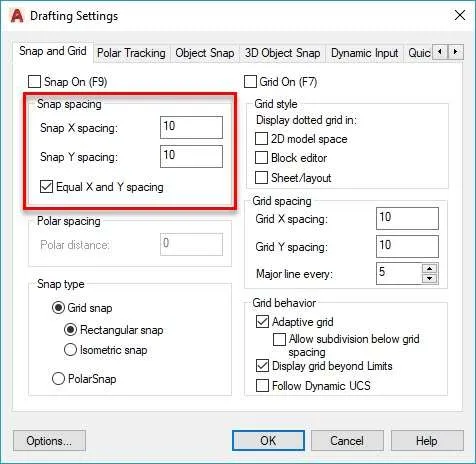
Toggle Snap mode, when the snap mode is active AutoCAD cursor will jump to specific points in the drawing area which is defined in snap mode.
F10
Toggles Polar tracking on/off. With polar tracking active you can make lines inclined to any angle which is defined in the polar tracking increment angle.
F11
Toggles Object snap tracking on/off.
Using this option you can track snap points of geometries like center, midpoint, endpoint etc and make geometries with their reference.
DYNMODE
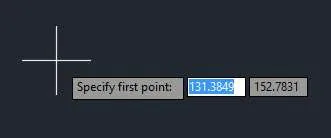
By default, the value of this system variable is set to -3 which keeps it off you change this system variable to 3 to make dynamic input active.
Dynamic input allows you to add information dynamically on the cursor tooltip.
ISODRAFT
Using this toggle you can activate the isometric drawing plane in AutoCAD. You can select from Isoplane Left, Isoplane Top and Isoplane Right.
You can also toggle between different isoplanes using F5 function key.
The default value of ISODRAFT option is orthographic.
LWDISPLAY
This system variable toggles the visibility of lineweight in a drawing.
The default value of this system variable is OFF which keeps the lineweight display off you can change its value to ON to keep lineweight visible in the drawing area.
TRANSPARENCYDISPLAY
Just like lineweight this status variable allows you to toggle the visibility of transparency of an object.
You change the value of this system variable to 1 to make transparency visible or 0 if you want to make it invisible.
SELECTIONCYCLING
Using this system variable you can select overlapping objects very easily.
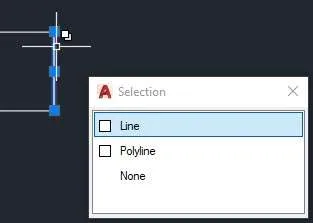
When the value of this system variable is set to 2, an overlapping icon and a menu containing a list of overlapping objects appear and you can select the required object from this list.
If you set the value of this system variable to 1, only the overlap icon appears not the menu.
You can turn this off by changing the value of this system variable to 0.
GRAPHICSCONFIG
Using this status bar option you can open the Graphics configuration window which is used to change settings related to the display and graphics properties of AutoCAD.
You can also use 3DCONFIG for opening the graphics performance window.
Basic AutoCAD Commands
This is the list of some of the most basic AutoCAD commands which every AutoCAD user should know.
These are some of the Draw and Modify commands which make the very basics of AutoCAD and if you are just starting to learn AutoCAD then you should know all of these basic commands.
L
It can be used for making simple lines in the drawing.
C
It is the command used for making a circle in AutoCAD.
PL
This command can be used to make a Polyline in your drawing.
REC
This command will make a rectangle in AutoCAD.
POL
This command can be used to make a polygon with minimum of 3 sides and a maximum of 1024 sides.
ARC
As the name suggests, this command can be used to make an arc in AutoCAD.
REG
This command can be used to make a region geometry in AutoCAD.
ELLIPSE
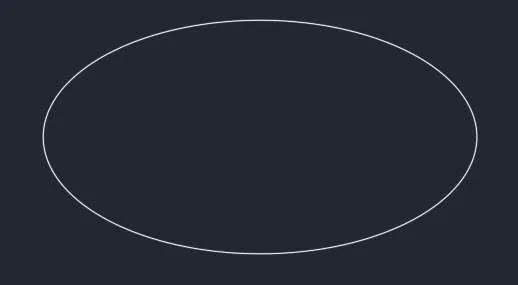
As the name suggests, this command can be used to make an ellipse with the major and minor axis.
CO
This command is used to copy the object(s) in AutoCAD.
ARRAY
Using this command you can make Rectangular, polar or Path array.

TR
This command is used for trimming a geometry.
EX
This command extends the selected object to meet the reference object which is selected.
I
This command can be used to insert an existing block or a drawing as a block in AutoCAD.
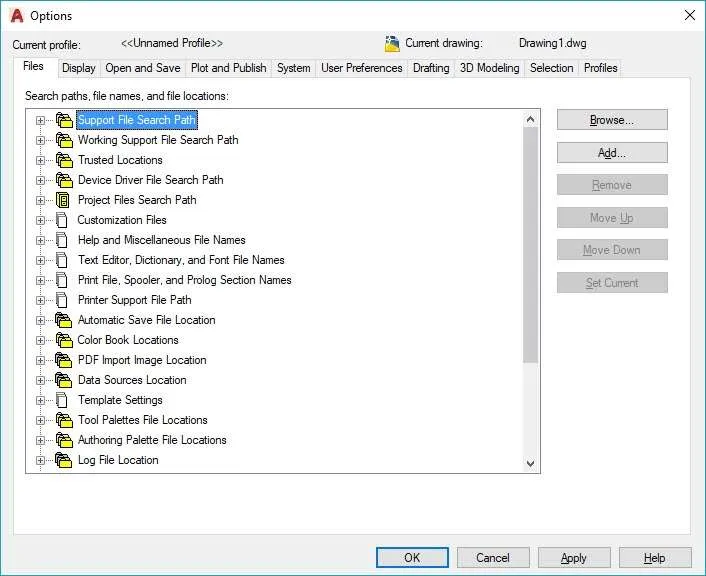
OP
Using this command you can open options window which contains most of the settings of AutoCAD.
SC
This command is used to change the scale of an object.
X
This command can be used to explode objects like Polyline to simple lines, an array or a block to a simple geometry etc.
F
This command can be used to add rounded corners to the sharp edges of the geometry, these round corners are also called fillets.
CHA
This command can be used to add slant edges to the sharp corners, these slant edges are also called chamfers.
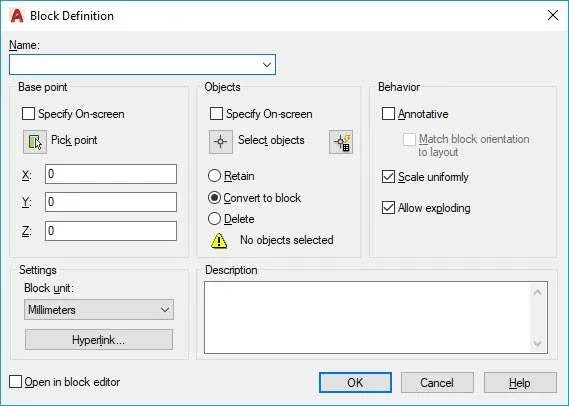
B
This command is used for creating a block, the properties of the block can be defined using the block definition window.
LA
This command can be used to open the layer properties manager palette which is a tool for creating and managing layers in a drawing.
REVCLOUD
Using this command you can make revision clouds that are essentially drawing markup tools.
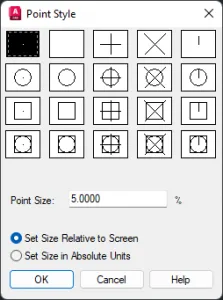
POINT (PO)
This command makes a single-point geometry in the drawing.
To modify the type of point created by this command you can use the PTYPE command and choose the desired point type from the Point Style window as shown in the following image.
SKETCH
You can make a freehand sketch using this command. You can use Line, Polyline or Spline as the object type for making this freehand sketch.
DONUT
It creates two circles with a filled area in between by inputting the inner and outer dimensions of the two circles.
ML
Multiple parallel lines can be created using this command. This command is great for making walls with predefined thicknesses.
SPL
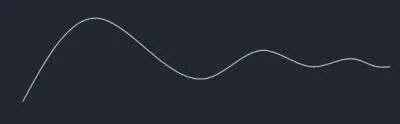
Using this command the user can create smooth curves with control points for changing the curvature of the sketch.
The following image shows an example of a spline.
DT
Starts the single line text command in AutoCAD which perhaps is the most basic texting command in AutoCAD.
This allows to insertion of the text in a single line.
MT
This allows the user to insert text in Multiline text format. Mostly this is used to insert a large text or a paragraph.
Mtext Is also associated with a text editor dialogue box where the user can make many changes and text formatting in the software itself.
DJO
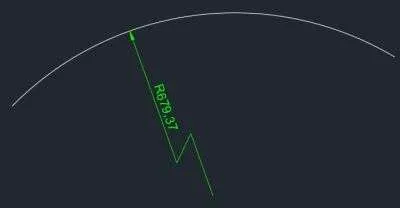
Jogged dimensions can be created and marked in the drawing using this command. A jogged dimension is shown in the following image.
SC
This command is used to change the scale of an object.
General Commands
These are some of the commands which can be frequently used in your drawing workflow to improve your overall efficiency.
You might be familiar with many of these commands but there are also some commands which are really helpful but still, they remain largely unused.
COUNT
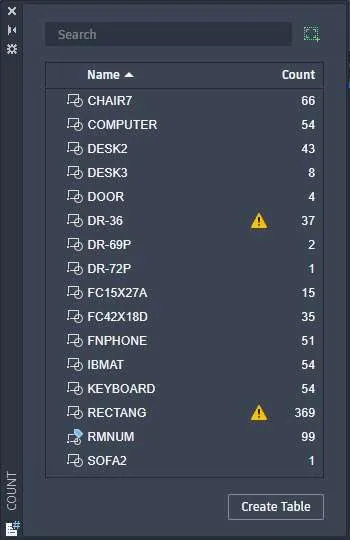
This command shows the number of blocks in a drawing in tabular form.
You can select the entire drawing or a specific area from the drawing to count the blocks from.
PEDIT
This command will start the Polyline edit tool that you can use to edit polylines or convert 2D geometry like lines and arc into a polyline.
MULTIPLE
If you want to repeat any command without pressing enter key then use the MULTIPLE command. To cancel the repetition of the command press the ESC key.
NCOPY
Use this command to copy nested objects from a block or xRef without exploding them.
‘CAL
Using this subcommand you can perform calculations directly on the AutoCAD command line even when you are in the middle of a command.
You can start this subcommand by entering ‘CAL (don’t forget to add an apostrophe before CAL) while running any other command.
To know more about this subcommand refer to the related article.

BURST
Explodes the block containing attributes retaining the attribute setting and its layer definition.
This is especially helpful if you want to retain the text of attribute after exploding the block.
ARCTEXT
This command can be used to write arc-aligned text in AutoCAD.
This command has options for changing text formatting and text alignment direction along the arc.
SP
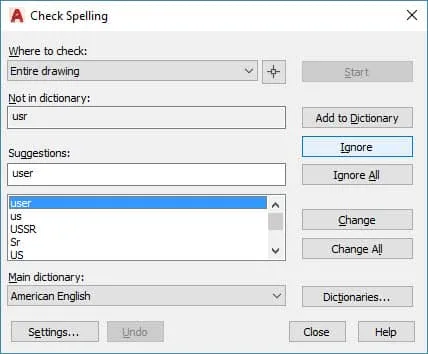
Using this command you can check the spelling of selected text and correct the spellings from the Check Spelling window.
OOPS
This command can be used to restore the last deleted object in your drawing.
After deleting an object if you made many other changes in the drawing and realized that you might need to restore the deleted object then simply type OOPS and press enter.
CHSPACE
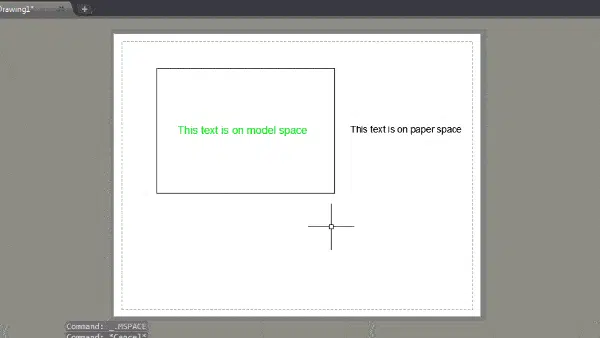
This command can be used to change the space of an object from model space to paper space and vice versa.
See the animated image shown below for reference.
DIVIDE
You can use this command to divide any 2D geometry into many equal parts. At each point of division, a point geometry will be added to the 2D curve.
RENAME
If you need to rename any named object like layer, block or linetype simply use this command to rename it.
More about this command can be found in this related article.
BREAK
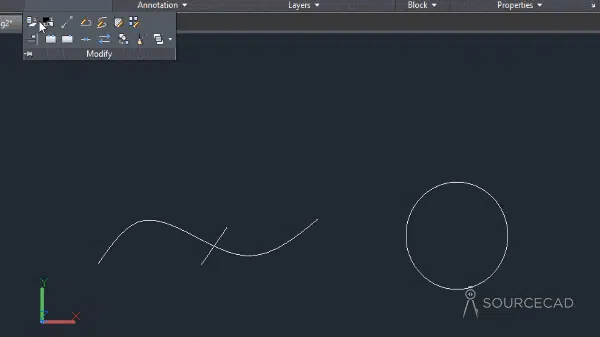
This command can be used to break 2D geometries at one or two points.
It is helpful if you want to break a curve at the point of intersection with another curve or if you want to create a gap by breaking a part of the geometry.
DI
It can be used to find the distance between two points in the drawing.
TIME
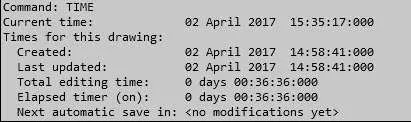
Using this command you can find a lot of information about your drawing like the date when the drawing was created and the total editing time consumed on the drawing.
QSELECT
This command can be used to make the selection from your drawing with filters.
As an example, you can use quick select to make a selection set containing all circles of the drawing with the radius of a particular value.
COPYBASE
Using this command you can copy any object using a base point.
PASTECLIP
You can paste the copied objects from the clipboard to your drawing using this command.
If you use COPYBASE to copy the objects then you will be able to paste them into the same or another drawing with the selected base point.
LIST
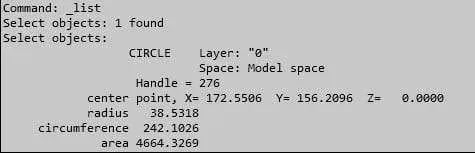
Using this command you can find lots of properties of an object like the layer they are on, area, length or radius, perimeter or circumference and a lot more.
To use this command simply type LIST on the command line then press enter and select the object from the drawing area about which you want to know and press enter again.
TJUST
Using this command you can change the text justification of Text and Mtext elements in the drawing.
DIM
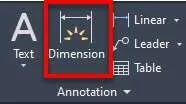
This command was introduced in AutoCAD 2016 version and it can be used to make most of the dimensions like Linear, aligned, radius, diameter and baseline.
To access this command you can use the DIM command or select the DIM tool from the dimensions panel of Annotate tab.
TOLERANCE
If you want to add a feature control frame representing tolerance-related information in your drawing then you can use this command.

ML
Using this command you can make a multiline geometry which contains multiple parallel lines.
SCALETEXT
Using this command you can change the scale of the existing Text or Mtext object in the drawing.
To use this command type SCALETEXT on the command line press enter and select the text from the drawing area and press Enter again.
Now select the “Existing” option from the command line and then select the “scale factor” option and then type the scale in which you want to convert the text height and press enter.
When the scale of these text entities is changed the base point will remain fixed.
BASE
Using this command you can change the base point of a drawing without changing its origin.
This is especially helpful in the situation where you want to insert the drawing into another as an Xref.
By default, AutoCAD takes origin as the base point which can be modified using this command without changing the origin.
ID
This command can be used to find the coordinate values of a point in AutoCAD drawing.
DWGPREFIX
If you have a drawing open in AutoCAD and you don’t know the location where it is saved you can simply type the DWGPREFIX command to look at it.
This command can be used to quickly find the location of Xref’s attached to the drawing.

UNITS
Using this command you can set the drawing units and other settings like the precision of linear and angular dimensions and default rotation angle.
TINSERT
You can insert a block or a drawing as a block in the table using this command.
You can also fit the block in the table cell and also justify its location automatically with TINSERT dialogue box.
I have made a simple table by importing blocks of the design center as shown in the image below.
MIRRTEXT
By default, AutoCAD does not mirror text in the drawing but if you want to mirror the text of your drawing then change the value of MIRRTEXT system variable to 1.

AREA
As the name suggests this command can be used to find the area of closed or open shapes in the AutoCAD drawing.
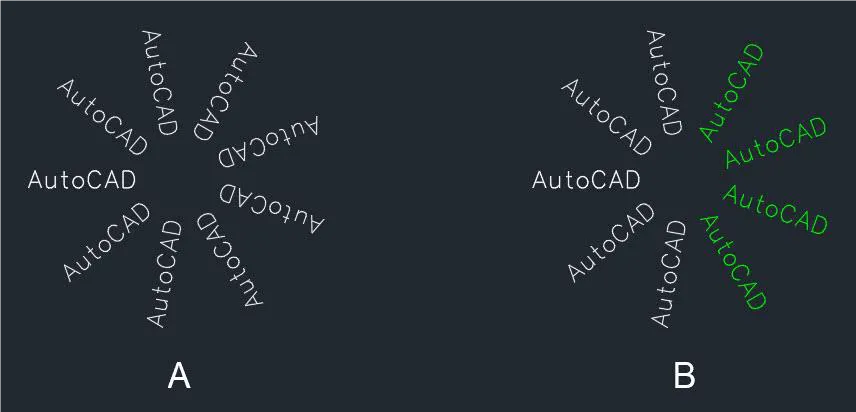
TORIENT
Using this command you can reorient text entities in the best readable position.
In image A below the text is oriented at different angles and in some situations, the text is not properly readable.
Whereas in image B below TORIENT command has been used to make the text readable from all angles.
MINSERT
Using this command you can insert existing blocks of a drawing as a rectangular array component.
An array added using MINSERT command can’t be exploded.
BOUNDARY
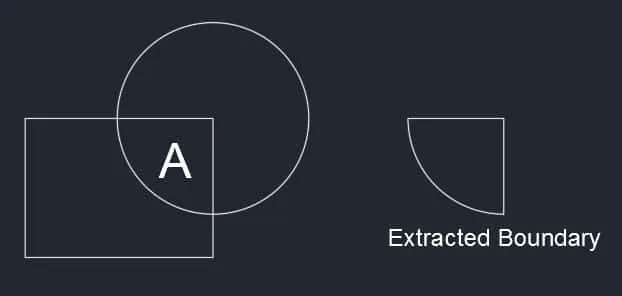
Using this command you can extract closed boundaries from any enclosed area.
This boundary can be used to find the area of the enclosed region or for many other applications.
In the image below the boundary of the area mentioned as A has been extracted as a polyline using the BOUNDARY command.
TXT2MTXT
Using this command you can convert a text object into a Mtext object and you can also combine multiple separate Mtext objects into a single Mtext unit.
DIMROTATED
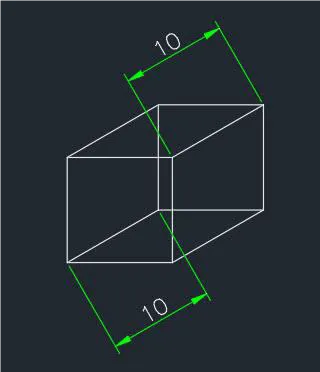
This command can be used to make a dimension line inclined to a particular angle with respect to the positive side of the X-axis.
In the example shown below the dimensions are made with the DIMROTATED command.
BREAKLINE
You can use this tool to make a Breakline symbol on a line.
Type BREAKLINE on the command line and press enter then click on scale option of the command line and apply an appropriate scale to the breakline.
Select the starting and end points of the breakline then click at any point on the line to specify the location of breakline or directly press enter to place it exactly at the center of the line.

J
This command helps to join similar objects to make them a single object.
For example, different lines drawn continuously can be joined to make them a polyline.
S
This command helps the user to stretch the object to the required length. The selection method decides the process of stretch on the object.
LEN
This command helps to change the length and angle of lines and arcs.
O
Using this command you can create a replica of the original sketch at a specified distance from the actual sketch.
HATCH
This command allows to fill up the closed area with a particular hatch pattern, gradient or solid fill.
GRADIENT
This command allows you to fill up the closed area with a particular colour gradient.
FILETAB
You can show the file tab if it is not visible using this command.
To hide the file tab you can use the FILETABCLOSE command.
File tabs are shown in the following image.

TXTEXP
Using this command you can convert single line as well as multiline text into geometries.
XLINE (XL)
Using this command you can make infinite lines starting from the point of selection.
When you trim or break this infinite line to a finite length it becomes a simple line geometry.
Performance Related Commands
There are several inbuilt tools and commands in AutoCAD that help you keep the performance of AutoCAD optimized.
In this section, you will find all those performance and optimization-related commands which you can use in your daily workflow.
PURGE
This command can be used to remove unused named objects like layers, blocks and dimension styles from the drawing.
LAYDEL
Using this command you can delete some of the most stubborn layers from your drawing which can’t be removed using PURGE command.
This command can also remove the Defpoints layer and also the layer containing objects but I would not recommend that.
OVERKILL
Use this command to remove overlapping or unnecessary geometries from the drawing.
ECOVERALL
This command repairs a corrupted or damaged drawing along with all of its attached Xref’s.
AUDIT
This command should be used for removing errors from your drawing.
It is always a good practice to keep checking your drawing file with the AUDIT tool for errors.
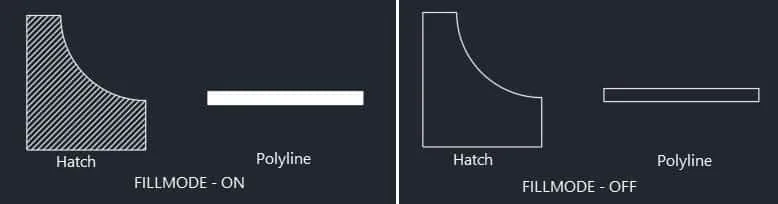
FILLMODE
Using this system variable you can turn off or on the visibility of filled area in hatches or wide polylines by changing its value to 0 or 1 respectively.
By turning the FILLMODE to off you can enhance the performance of AutoCAD by limiting resources consumed on regenerating the filled geometries.
You need to regenerate the drawing using REA command after changing this system variable to see its effect on the drawing.
HIGHLIGHT
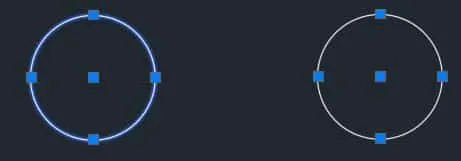
This system variable is also similar to SELECTIONPREVIEW but in this case, the object will appear highlighted when selected.
Its default value is 1 but you can turn off this highlight effect by changing its value to 0.
SELECTIONPREVIEW
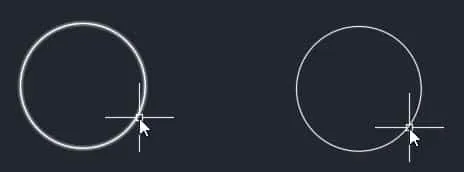
When hovering the cursor over any object a preview will appear if the value of this system variable is set to 3.
You can remove this preview thereby improve the performance by changing the value of this system variable to 0.
ISAVEPERCENT
You can change the value of this system variable to reduce the time it takes to save a drawing.
This system variable also affects the file size of AutoCAD drawings and their compatibility with other software.
By decreasing the value of this system variable you can increase its compatibility with other software and it also decreases the size of the CAD file but the time consumed in save operation generally increases.
When you increase the value of this system variable opposite happens.
The default value of this system variable is 50 and it can be changed from 0 to 100.
APERTURE
This system variable controls the area of influence of object snap.
The aperture size as defined by this system variable is the area of the square under which the point will be selected if the cursor is brought into it.
The default value of this aperture is 10 but depending on the complexity of the drawing you can change this value between 1-50.
The size of the aperture is relative to the current scale of the screen and it is not an absolute value.
In the image below the red box (not visible in AutoCAD) is the aperture size for two values 10 and 50 respectively.
SAVEALL
As the name suggests this command can be used to save all of the open drawings in the AutoCAD window.
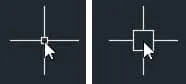
PICKBOX
Using this system variable you can change the size of Pickbox which appears at the cursor of AutoCAD.
The default value of this system variable is 3 and you can change its value from 0 to 50.
In the image below the size of Pickbox is 3 for the first cursor and 10 for the second cursor.
CLOSEALL
If you have multiple tabs open in your AutoCAD window and you don’t want to manually close them one by one then you can simply use CLOSEALL command to close all the open windows.
AutoCAD will prompt you with the save dialogue box before closing all unsaved drawings and it will take you to start screen after closing all of the drawings.
CLOSEALLOTHER
Using this command you can close all open drawing windows except the current drawing window.
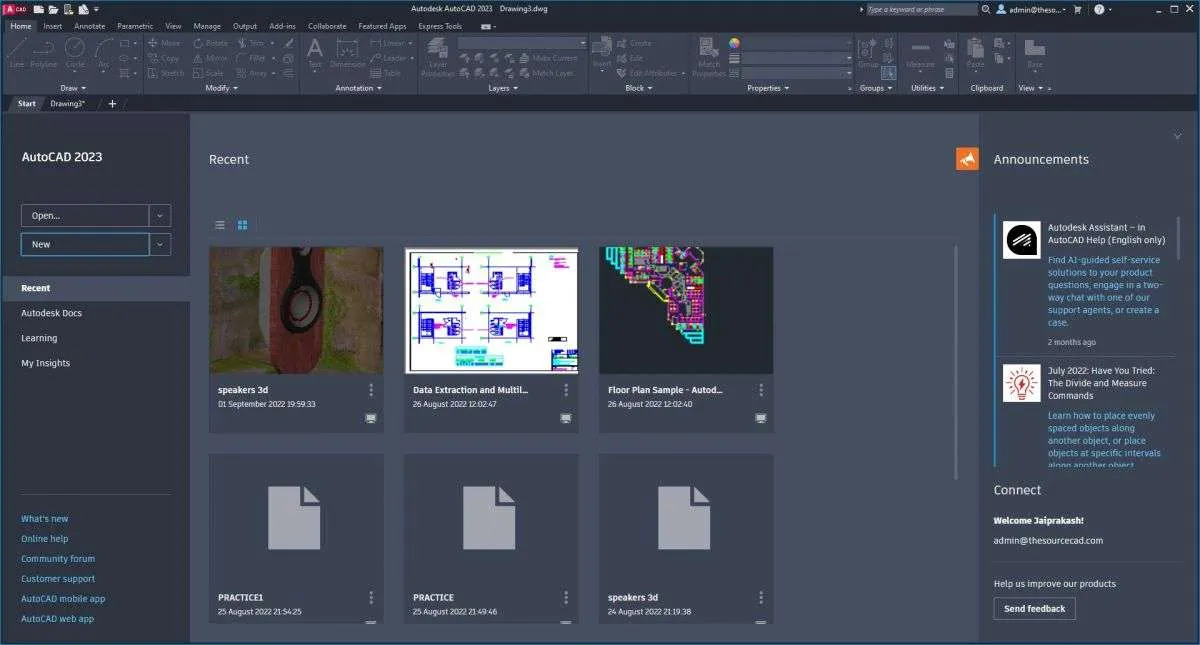
STARTMODE
This system variable will toggle the visibility of the start tab at the beginning of the AutoCAD application.
By default the value of this system variable is 1 which allows the start screen to appear, you can change this value to 0 if you don’t want to see the start screen.
FILEDIA
This system variable suppresses the dialog box that opens up when invoking certian commands like Save, Save As and Export.
The default value of this system variable is 1 which allows the dialog box to open.
When you, however, change the value of this system variable to 0 the command will run on the command line and the dialog box will not open.
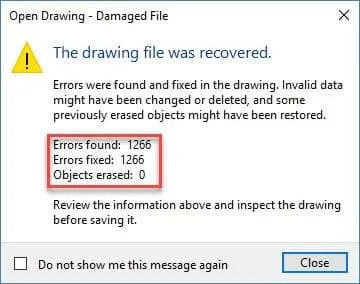
RECOVER
This command is similar to the AUDIT command but it is useful for the drawings that are corrupted to such an extent that you can’t even open them.
ZOOMFACTOR
This command controls the magnification with respect to the turning of the mouse wheel.
Its value is between 3 and 100 with the default value set to 60.
The higher the value more will be the effect of zoom wheel motion.
QP
This command will bring up a quick property window, where the essential and common properties will be listed for the objects that are selected.
TEXTFIT
Using this command you can shrink or expand the text entities in a drawing to fit in the required area.
In the example below I have fitted the AutoCAD text within the rectangle using TEXTFIT command.

WIPEOUT
Using the wipeout command you can clean the background in a crowded drawing to make overlaying objects clear against the background.
In the image shown below Wipeout command has been used to clean the area around the second hook.
You can use the WIPEOUTFRAME system variable and change its value to 0 to remove the wipeout frame boundary also.
-DWGUNITS
Using this command you can change unit of AutoCAD drawing from one unit to another and you can also scale the existing drawing to new scales automatically.
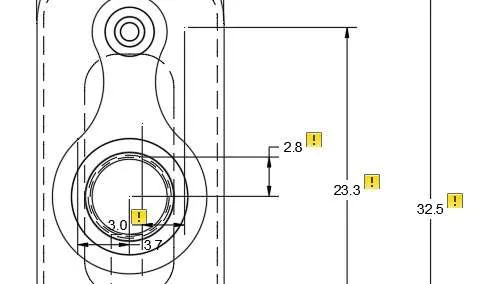
ANNOMONITOR
When this system variable is ON it shows all the non-associative dimensions and multileaders with a yellow badge.
When it is set to off it shows no warning badge.
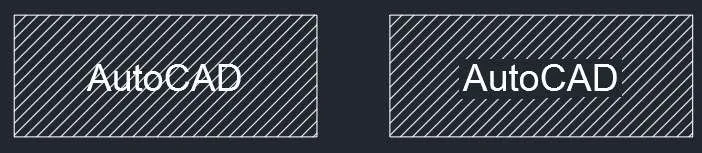
TEXTMASK
Using this command you can automatically create a masking behind the text to make it clearly visible against the crowded background.
In the image below Textmask has not been applied for the first case and in the second case, it has been applied.
LAYMRG
If you want to merge layers of multiple objects then this command is for you.
Type LAYMRG press enter key then select the objects whose layers you want to change then press enter again.
Select any object of the target layer on which you want to transfer the selected objects and press enter again.
All the objects of the selected layer will be transferred to the end layer and also the selected layer will be removed.
you want to merge layers of multiple objects then this command is for you.
Type LAYMRG press enter key then select the objects whose layers you want to change then press enter again.
Select any object of the target layer on which you want to transfer the selected objects and press enter again.
All the objects of the selected layer will be transferred to the end layer and also the selected layer will be removed.
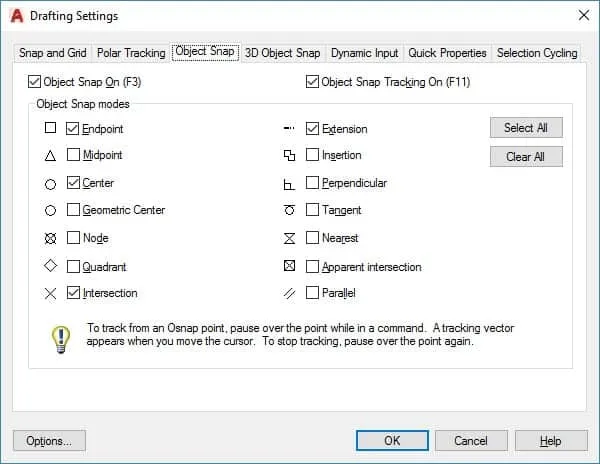
DS
Using this command you can open the drafting settings window which can be used to change settings related to status bar options like object snap, polar tracking, snap and grid settings.
TABLET
If for some reason you are looking to use the Tablet as a pointing and navigation device in AutoCAD then you can use this command to turn the Tablet input on and off.
The Tablet can be turned on and off using the TABMODE system variable also.
You can learn more about this command on this Autodesk Knowledge Network page.
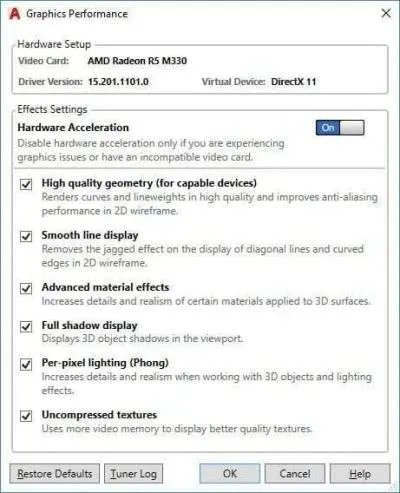
3DCONFIG
You can use this command to Turn on/off hardware acceleration or change the graphics-related properties of AutoCAD like smooth line display and high-quality graphics display.
ICL
This commands crops the selected image with respect to the boundary defined.
Accessibility Commands
These commands will help you in making your overall drawing workflow faster by eliminating the need for using many repetitive tasks.
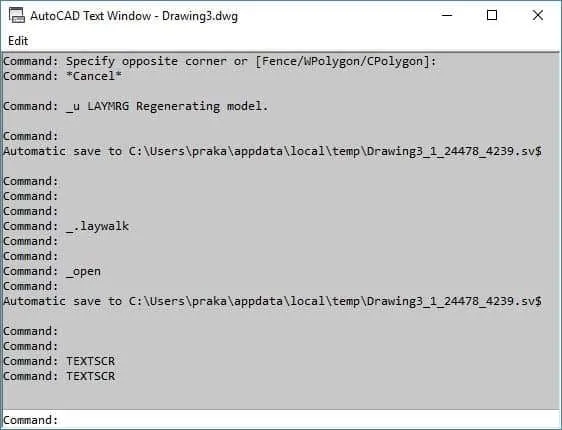
TEXTSCR
This command will open a text window which has a history of recently used commands.
MA
This command is a great time saver if you want to copy properties of one object on another without changing its geometry or contents.
CENTERLINE
As the name suggests you can add a centerline easily between parallel or intersecting lines using this tool.
See the related article for more on Centermark and Centerline tools.
CENTERMARK
This tool was added in the AutoCAD 2017 version and it allows you to create center mark easily on a circle or arc.
LAYMCH
Using this command you can change the layers of selected objects.
To use this command type LAYMCH on the command line, press enter key.
Select objects whose layer assignment you want to change, press enter again.
Select any entity of the layer you want to apply to selected objects, and press enter key again.
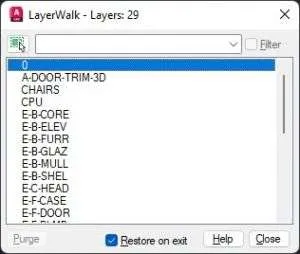
LAYWALK
Using this command you can check all the objects which are on a particular layer.
When you use LAYWALK command a list with all layers appears on the screen and you can click on any of the layer(s) from the list and objects from that layer(s) will only become visible in the drawing area.
The original status of layer and object visibility is restored once you close LAYWALK window.
BATTMAN
This tool can be used to modify the attribute information of blocks containing attributes.
FS
Using this command you can select objects which are connected to the selected object in the drawing area.
The behaviour of this command is controlled by FSMODE system variable, if the value of FSMODE is OFF then FS command will select only the selected object and one object that is directly connected to the selected object.
If the value of FSMODE is ON then the FS command will select the selected object as well as all the objects connected to it and its next connected object in the series.
This selection series continues as long as the command finds connected objects.
TEXTTOFRONT
Using this command you can bring TEXT, Dimensions and Leader lines on the front of all underlying objects like hatches.
This command is especially helpful if you want to bring multiple annotations to the front of all drawings objects without changing their draw order selectively.
ISOLATE
Using this command you can hide all objects from the drawing area except the selected objects.
By hiding unnecessary objects from drawing you can get a clean work area.
To bring back all the hidden object back to the drawing select UNISOLATE or UNHIDE command.
HIDEOBJECTS
This command is similar to ISOLATE command but in this case, you can hide selected objects keeping remaining objects visible.
In this case, also you can bring back hidden objects by using UNHIDE or UNISOLATE command.
GROUP
Using GROUP command you can group multiple objects as a single unit.
This command is great for making groupings of the similar type of objects like a group of similar blocks.
To break this group you can use UNGROUP command.
ADCENTER
This command can be used to bring the Design Center palette to the drawing area.
You can also use the CTRL+2 key to open the design centre palette.
FIELD
Fields are dynamic text information which can add a lot of intelligence to your drawing by keeping data interlinked and updated.
Fields are extensively used in the sheet set and layout drawings and they can be used to automate a lot of information in AutoCAD drawings.
You can start the Field window using FIELD command of AutoCAD.
IMPORT
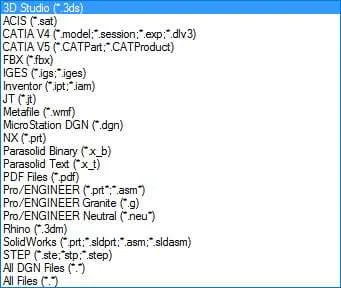
Using this command you can import drawings of many different formats in AutoCAD, the list of all supported formats is shown in the image below.
WBLOCK
If you want to export a certain part of your drawing or any of its blocks to an external file then you can use write block tool or its command equivalent WBLOCK.
PUBLISH
Using this command you can print multi-sheet files directly, unlike PLOT command which only plots single sheet this command will allow you to plot multiple sheets or even all of the sheets of the drawing directly.
TCOUNT
Using this command you can add bullet points and numbered lists along multiple rows of the text.
An example is shown in the image below, figure A is the text we used for example and figure B is the result after using TCOUNT on the rows of texts.
MA
This command is used to transfer properties like lineweight, transparency, layer, color and more from one object to another.
LTS
This command changes the scale for the Line Type and applies throughout the drawing.
LW
This command changes the line weight of the object.
ID
The current coordinate of a point can be determined using this command
EXP
This allows the user to save the drawing to a different file format as shown in the following image.
MEA
Using this command the user can measure the distance , radius, area and volume of the selected object
EPDF
The drawing can be exported and saved as a PDF file by using this command.
XR
This command opens up an external reference palette and you can use it to attach DWG, PDF or images in your drawing as external references.
RE
This tool is the same as that of a “refresh” function in the windows operating system.
This will regenerate the entire drawing in the software showing any changes you’ve made.
BE
This command allows us to edit the block and its parameters.
This command will take the user to an exclusive block editor window where all the changes can be made and saved in the block.
MLD
Call out or leaders can be placed in the drawing by using this command.
MLE
Multileaders size, text etc can be edited using this command.
COMPARE
Using this command you can compare two versions of the same drawing and all the changes in it.
ACTRECORD
Using this command you can record the repetitive actions in your drawing and replay them again to automate the entire process without having to write the macros.
SHARE
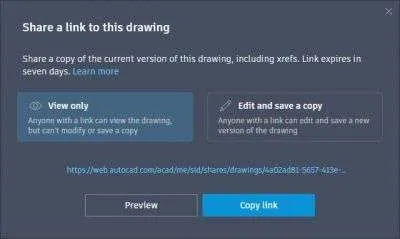
Using this command you can share your drawing using a URL with the Autodesk cloud.
The recipient can view the drawing without using AutoCAD software in a browser.
DWGHISTORY
Using this command you can show the history of a drawing and all the changes made to it. This command will work only when you save your drawing using a cloud service like Box, Dropbox or OneDrive.
3D Commands
This section has some noteworthy AutoCAD 3D commands related to solid, surface and mesh modelling.
You might be familiar with many of these commands but there are also many commands which are not frequently used despite their great features.
EXT
This command extends the 2D object to the third axis which is the Z axis, so as to convert it into 3D.
REV
This command helps the user to create a 3D solid by revolving a 2D region around an axis.
SWEEP
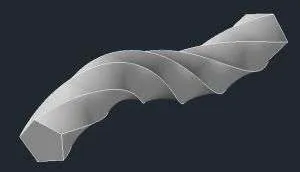
Using this command you can sweep a 2D geometry along a path. The following image shows an object created with sweep.
BOX
This command will create a 3D box shape without using any 2D base sketch.
CYL
A 3D solid cylinder can be made using this command.
Here the user has to provide the radius or diameter of the base and then provide the height of the object.
PYR
3D Solid pyramid can be created using this command.
The user first has to provide the base dimension and then provide the height of the pyramid.
LOFT
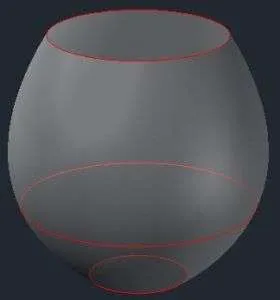
Using the LOFT command you can join two or more 2D curves to make a lofted 3D object. In the following image red 2D curves were used to create this lofted 3D.
SL
This tool divides a 3D object or 2D surface into two different part.
THICKEN
Using this command you can convert a surface into a 3D solid by adding thickness to it.
CONVTOSOLID
Using this command you can convert 3D mesh and watertight objects made with surfaces to 3D solid and you can also control whether converted solid is smooth or faceted.
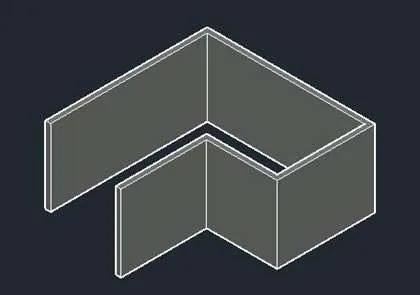
POLYSOLID
Using this command you can make a 3D wall-like shape as shown in the image here.
You can also define height and thickness of this poly solid using command line options.
REGEN3
This command was introduced in AutoCAD 2017.1 update and it is especially helpful in removing the 3D graphics related anomalies and surface tessellations.
DELOBJ
This system variable controls the behavior or 2D curves when 3D tools like Extrude, Presspull and Sweep are used.
You can change the value of this system variable so that AutoCAD either retains or deletes curves after converting them to 3D.
VOLUME
Using this command you can find the volume of a 3D solid as well as lots of other information like its moment of inertia, radius of gyration, centroid, and products of inertia.
INTERFERE
This command can be used to detect intersecting 3D solids.
The command is especially useful in situations where you want to detect clashes between different solids like pipes and walls.
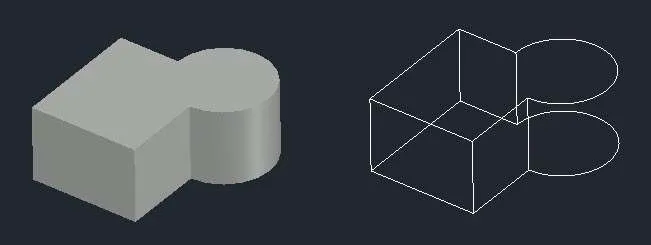
XEDGES
You can extract edges of a 3D solid as 2D geometries using this tool.
In the image shown here the XEDGES tool has been used to extract the edges of the 3D solid and then the solid geometry has been moved to reveal the edges only.
SECTIONPLANE
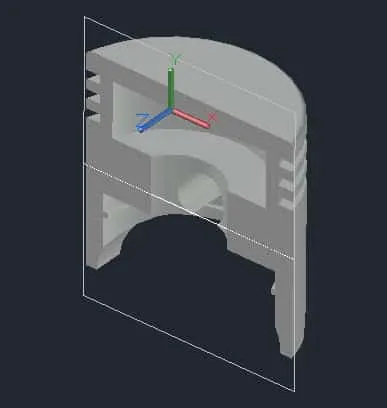
Using this command you can create a section plane in the drawing that can be used to see the 3D drawings by sectioning them along different planes.
FLATSHOT
This command is great for converting a 3D drawing into 2D.
Using this command you can also create multiple views of a single 3D drawing like the front, top and isometric on a single plane.
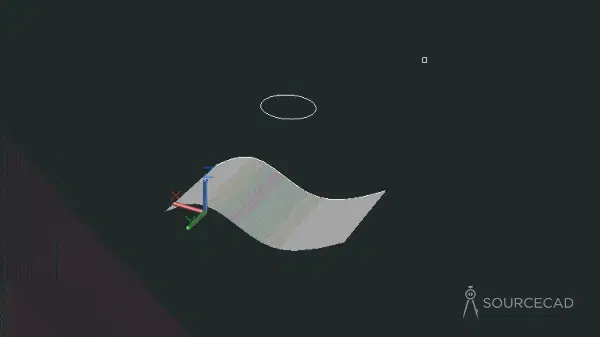
PROJECTGEOMETRY
Using this command you can project a 2D curve on a 3D surface, solid or region as shown in the animated image below.
Shell (SOLIDEDIT)
Using this command you can convert a 3D solid into a hollow solid with a wall thickness.
To use this command type SOLIDEDIT on the command line press enter type B press enter again type S and press enter again.
Alternatively, you can also select the shell tool from the Solid editing panel of the Solid tab.
HELIX
As the name suggests this command can be used to make a helix in AutoCAD drawing.
SURFTRIM
This command is similar to the trim command of 2D drawings but in this case, it will trim surfaces instead of 2D geometries.
FACETRES
This command adjusts the smoothness of shaded and rendered objects and shadows.
Its default value is 0.5000 and you can change it from 0.01 to 10.0.
The higher the value smoother will be the 3D objects but it will consume more processing power to render them.
IMPRINT
Using this command you can imprint 2D drawings on planar faces of a 3D solid or a surface to create additional faces for 3D tools like Presspull.
3DP
It prepares the watertight mesh object in AutoCAD and saves it in STL format for 3D printing.
CAM
It helps the user to set up a camera (Perspective) view so that the user can view the angle as if looking at it in the real world.
UNI
This command merges two or more 3D objects connected together into one.
SUBTRACT
This command subtracts one object from another 3D object provided they have interfering volume.
IN
This tool creates a 2D region, surface or 3D solid from the overlapping section.
Shell (SOLIDEDIT)
Using this command you can convert a 3D solid into a hollow solid with a wall thickness.
To use this command type SOLIDEDIT on the command line press enter type B press enter again type S and press enter again.
Alternatively, you can also select the shell tool from Solid editing panel of the Solid tab.
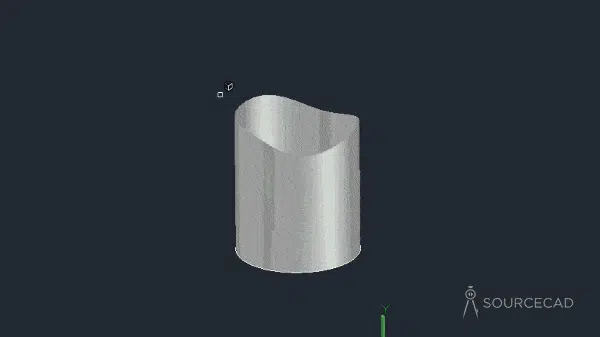
SURFPATCH
Using this command you can fill the open areas of a surface like the top of a cylinder as shown in the animated image below.
HELIX
As the name suggests this command can be used to make a helix in AutoCAD drawing.
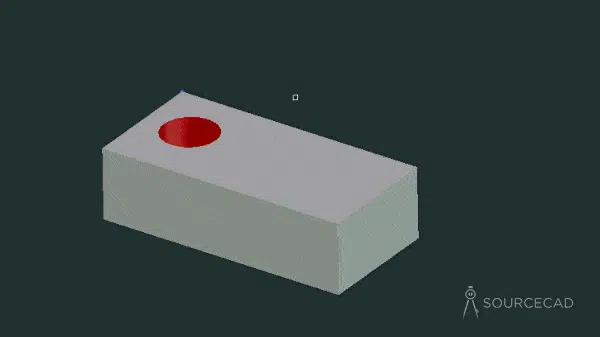
Moveface (SOLIDEDIT)
Using this tool you can move faces like a groove of a 3D solid from one point to other as shown in the animated image below.
For using this tool type SOLIDEDIT on the command line press enter then type F press enter then type M and press enter again.
SURFTRIM
This command is similar to the trim command of 2D drawings but in this case, it will trim surfaces instead of 2D geometries.
3DALIGN
Using this command you can align a 3D solid object with respect to another 3D solid, this video explains the use of this command in detail.
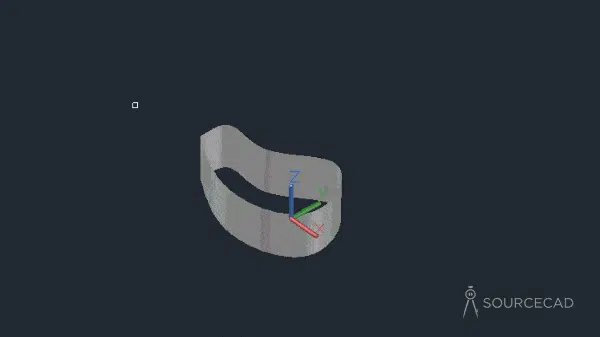
SURFOFFSET
Using this command you can offset any surface inside, outside or on both sides of the surface as shown in the animated image below.
SOLIDHIST
Using this tool you can record the history of solids on which boolean operations are performed and you can modify these solids later.
In the image below Subtract operation is performed on two solids and then the amount of removed part is changed by selecting the Cone by pressing CTRL key then changing its base radius.
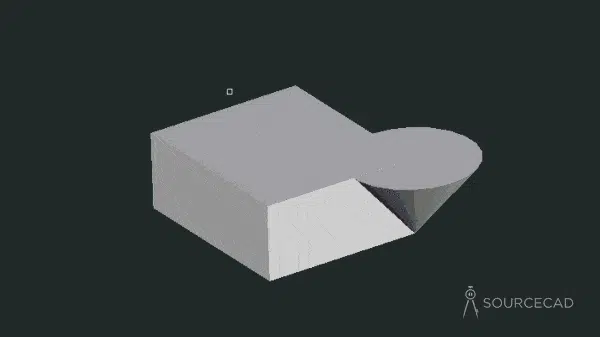
By default, the value of this system variable is 0 which keeps this feature off but you can turn it on by changing its value to 1.
IMPRINT
Using this command you can imprint 2D drawings on planar faces of a 3D solid or a surface to create additional faces for 3D tools like Presspull.
Did we miss any command or tool which should be included in this list? Let us know in the comments below.
Summary
So, that was our super comprehensive list of AutoCAD commands.
If you want to add more commands to this let me know in the comments area down below.