How to change unit in AutoCAD drawing
You can change unit in AutoCAD drawing using UN command but it does not scale your drawing to fit the new units. To ensure your drawing scale also changes with respect to the new unit you need to either use scale command and use a conversion factor to scale your drawing. Or You can use [ ]
You can change unit in AutoCAD drawing using UN command but it does not scale your drawing to fit the new units.
To ensure your drawing scale also changes with respect to the new unit you need to either use scale command and use a conversion factor to scale your drawing.
Or…
You can use a command that I am about to explain here, which will do the scale conversion as well automatically.
So, essentially in this article I will share all the methods that you can use to change the unit in AutoCAD drawing.
I have also made this video to explain these tips in detail, In case you don’t prefer the video scroll below for the article.
Method 1: Using -DWGUNITS command
Let’s assume that you have a drawing which is in imperial units (inches) and you want to convert it into metric units (mm), let’s name that drawing Sample.dwg.
This is an easy method of converting the unit of drawing but it will work only for AutoCAD 2009 and later versions.
Open Sample.dwg drawing (imperial) in AutoCAD and then type -DWGUNITS on the command line (don’t forget to add the dash before command) and press enter.
Now, look at the command line prompt which looks like the image shown below.
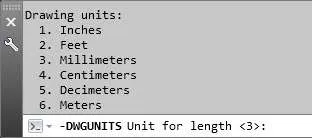
Here you need to specify unit which you want to use in the current drawing, type the order number of unit and that unit will be applied.
In this case, the millimeter option is in the third place and hence typing 3 and pressing enter will select millimeter as drawing unit.
Similarly, from other prompts use options as shown below.
Linear display format <2>
Linear display precision <4>
Scale objects from other drawings upon insert? <yes>
Match INSUNITS to drawing units? <yes>
Depending on your selection you may or may not see following prompts on the command line.
Select yes from both of these prompts.
Scale objects in current drawing to reflect change in units? <yes>
Include objects in Paper Space? <yes>
Your drawing is now converted to metric with millimeter as drawing unit and also it's scale is changed to reflect the new size as per updated unit.
You can verify the result by measuring the distance between any two points in the drawing, it will now be reported in millimeter instead of inches.
Method 2: Using simple unit command
To change the unit you can use the simple UN command and the Drawing Units palette will pop up like the image show below.
From this palette select a new unit from the Insertion scale drop down and click OK to close the palette.
For this example, I am unit millimeter from the drop down list.
The unit will change in the drawing but the scale is still unchanged.
Basically if you have a line of length 10 inch in the new unit it will show it as 10 mm.
So, we need to now scale our drawing using the SCALE command so that the new size of the 10 inch line becomes 254 mm as 1 inch is equal to 25.4 mm.
So, type SCALE on the command line and press enter key.
Then select the entire drawing and then press enter.
In the scale factor type 25.4 (1 inch is equal to 25.4 mm and we are converting inch to mm) and press enter key.
The size of entire drawing will also change and it will show the correct scale as well as unit.
Now if you insert any new drawing in your current drawing it will convert it to mm no matter the original unit of the drawing and it will scale it as well.
Method 3: Changing unit by block import
This method of converting unit is destructive in nature and you will lose a lot of data from your drawing, mostly named objects like layers, blocks, and
linetypes.
So, this should be used only when you can't use other methods mentioned above.
Open a new session of AutoCAD and click on New Drawing from the application menu.
A template selection window will appear select acadiso.dwt template from this window and click open.
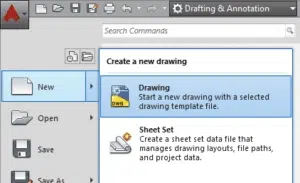
Now type UN on the command line and press enter Units window will appear.
Select millimeters from Insertion Scale drop-down menu, you can select any other unit as well as per your own need but for this article, I will stick with millimeters.
Now type I on the command line and press enter, browse your imperial unit drawing Sample.dwg from insert window.
Uncheck Specify On-screen radio button from insertion point, Scale and Rotation panels, also make sure explode radio button is checked in the lower left corner of the Insert window.
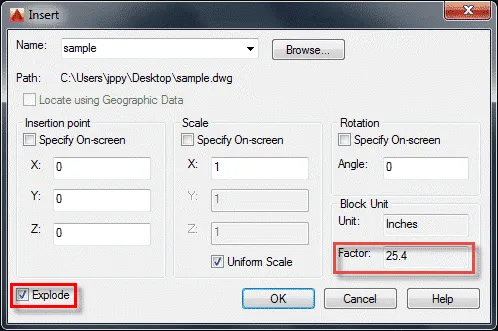
If you have followed all these steps correctly then you will see a conversion factor of 25.4 in block unit panel now click OK to close the Insert window.
Your drawing with converted units will be inserted into the new template and now if you check distances in drawing it will be reported in millimeter instead of original inches.
Summary
Changing unit in AutoCAD drawing is not always recommended and usually you should start a drawing with a unit and stick with it.
But if required you can change the unit using the methods shown in this article.
Do, you have questions related to this article?
Let me know in the comments down below.