What is the Defpoints layer in AutoCAD? Here is the answer
You must have noticed Defpoints layer in AutoCAD which is automatically created. Have you wondered why this layer is created automatically and what is the use of this layer? Keep reading this article to get the answers. What is Defpoints layer? This layer is usually created automatically when a dimension is added to your AutoCAD [ ]
You must have noticed Defpoints layer in AutoCAD which is automatically created.
Have you wondered why this layer is created automatically and what is the use of this layer?
Keep reading this article to get the answers.
What is Defpoints layer?
This layer is usually created automatically when a dimension is added to your AutoCAD drawing.
This layer stores information about definition points of dimensions.
Objects on this layer are visible in drawing area but these objects will not appear when you plot your drawing.
Essentially plotting is turned off for Defpoints layer.
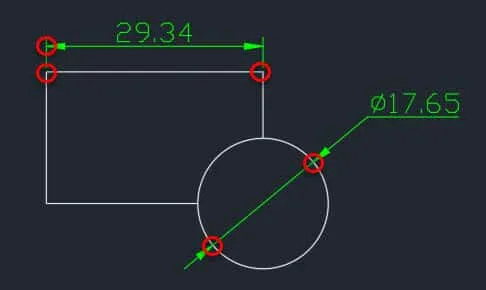
Definition points are reference points for dimensions that connect them to the geometry being dimensioned.
These are same points which appear at grip location when a dimension is added to an object as shown in the image above.
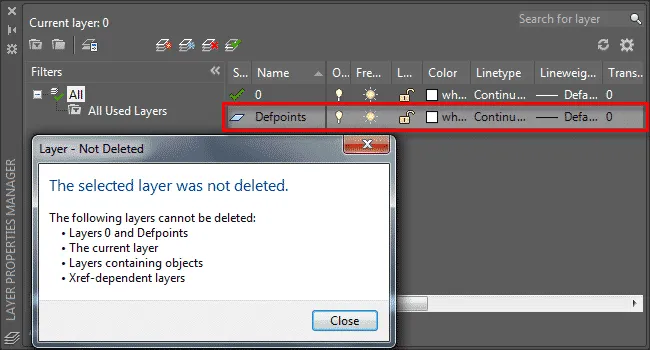
A Defpoint layer cannot be deleted and if you try to delete it then an error message will appear as shown in figure down below.
Although LAYDEL command can be used to delete this layer I won’t recommend it as it may create errors in your drawing.
Should I place objects on Defpoints layer?
Drafters generally use this property of Defpoints layer (no plot property) to place objects on this layer which they don’t want to plot for example viewports and construction geometries.
But it is not a good practice as it may lead to unexpected changes in drawing such as:
If you freeze layer 0 then anything placed on Defpoints layer will become partially locked and you will not be able to select objects on it.
On running AUDIT command all objects placed on Defpoints layer will be transferred to a new layer $AUDIT-BAD-LAYER and as a result, objects will remain visible in the plot.
Though you may not even notice any of these errors at all.
Still I would recommend you create a new no plot layer and put all objects that you don't want to plot on that layer.
Also we can add as many layers as we want in a drawing so it won't harm adding one more to the list, right?
Summary
So, try to always create a new layer with its plot turned off and then place all objects which you don’t want to show in the plot like viewport and construction geometries on that layer.
And leave Defpoints layers as it is.
Do you agree with us on this recommendation? Let me know in the comment section down below.