How to fix slow AutoCAD, here are 12 tips that work
You can fix slow AutoCAD and improve the overall performance using two approaches. The first one is speeding up your PC and the second one is fixing the speed of AutoCAD software itself. In this article, I will show you how to fix slow AutoCAD using both of these methods. If you prefer watching the [ ]
You can fix slow AutoCAD and improve the overall performance using two approaches.
The first one is speeding up your PC and the second one is fixing the speed of AutoCAD software itself.
In this article, I will show you how to fix slow AutoCAD using both of these methods.
If you prefer watching the video version of this article then here it is for you, however, if you prefer the article then read on.
So let’s start with fixing the PC speed as it can have a massive impact on the performance of AutoCAD.
Disable startup apps
You might have noticed that a fresh installation of the operating system works very fast and feels snappy.
It is mainly because it is free from the extra baggage that it accumulates over time.
So, removing this extra baggage will automatically fix the slow performance issue.
To fix the issue of this extra baggage and improve the performance of your PC you can disable programs that you don’t need.
Essentially you can disable these programs in start up so that when PC starts these programs don’t start automatically and you can still start them manually when needed.
Disabling these programs will free the RAM space, CPU and GPU processing power making room for AutoCAD to work properly.
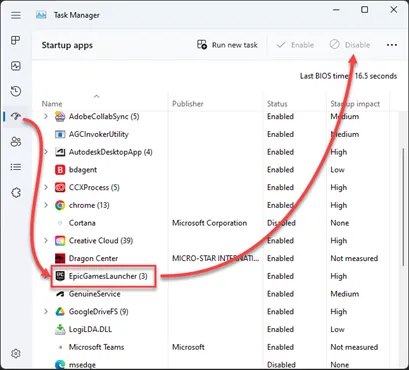
To disable startup apps press CTRL + ALT + Delete and then select “Task Manager” from the next prompt.
Now select the Startup apps and disable all the apps you don’t need, or don’t use every time the PC starts up as shown in the image here.
Close Google Chrome and other background apps
Google Chrome eats up a significant chunk of your system memory (RAM) and if you open multiple tabs it’s going to eat up even more space on RAM.
So, it’s better to keep it closed if you are not using it and it will make a significant impact on your system performance especially if you are working with limited RAM.
It’s also better to close other apps that are running in the background but not needed.
For example, messaging apps, outlook, or other apps.
Identify and fix hardware bottlenecks
Open the task manager using CTRL + ALT + Delete key then select “Task manager” in the next prompt.
Select the performance tab as shown in the image below.
In this tab, you will see the resource consumption in real-time and you can identify the hardware that is currently used to it's maximum.
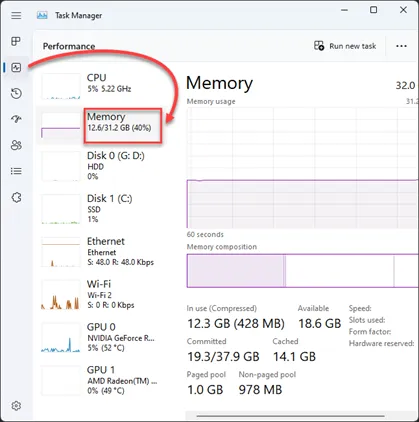
As an example, if you see disk usage at 100% then it’s time to upgrade your hard disk and change it to SSD.
If you are finding memory usage hitting the ceiling then it’s time to install more memory (RAM) in your PC.
This will essentially help you identify the “real” hardware bottleneck that is slowing your PC down and instead of randomly guessing you can invest in specific hardware that will improve your PC performance.
Clean temporary files and perform disk cleanup
AutoCAD needs at least 20 GB of free disk space to run smoothly and if you are running out of it then the performance will suffer.
So, it’s a good habit to keep the disk clean and you can do that very easily using Disk Cleanup.
To start disk cleanup press the Win + R key, and the Run dialogue box will show up.
Type cleanmgr.exe and press enter to run the command, this will open the disk cleanup tool.
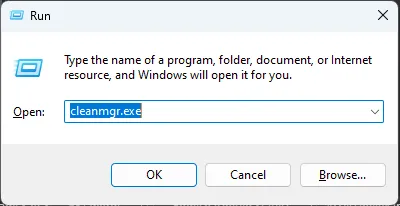
Select C drive from the list of available drives and click OK.
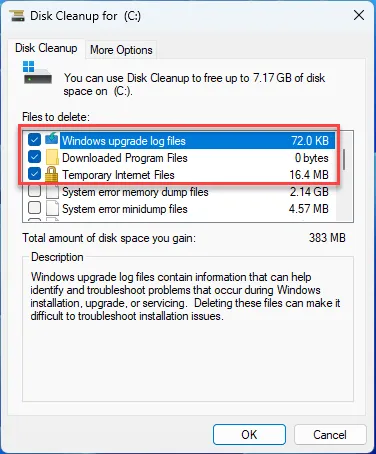
In the next window select the “Clean up system files” button as shown in the following image.
This will once again prompt you to select the drive, select C drive again, and click OK.
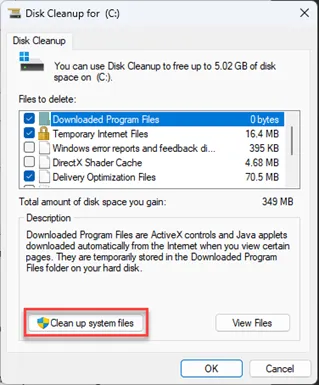
Now Disk Cleanup will perform a comprehensive search and it will list all the files that you can remove.
Check the boxes next to files that you can delete like Temporary files, Previous version OS, Temporary internet files, Windows upgrade log files, and more after checking it all click OK and the disk cleanup will clean it all.
Set windows to high-performance setting
You can set windows to prefer performance over display settings.
This will improve the performance of the software though the display quality might suffer a bit.
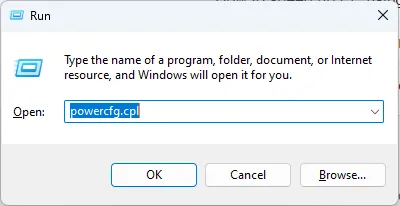
To activate this type Win + R key and then type powercfg.cpl and press enter key.
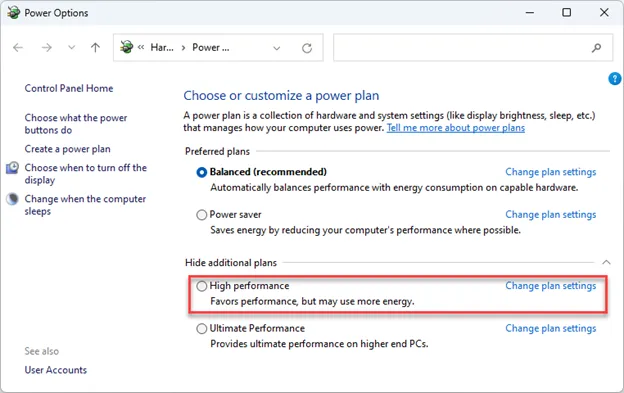
Now power options page will open up where you can select the “High performance” or “Ultimate performance” settings.
The “Ultimate performance” setting is only available in high-end systems and may not be available on all PCs or laptops.
Update operating system
Keep your windows operating system updated.
This will ensure you always have the latest drivers and updates that will ensure smooth performance of your PC and eventually AutoCAD as well.
To update windows type the Win + I key then select windows update from the page that opens up as shown in the following image.
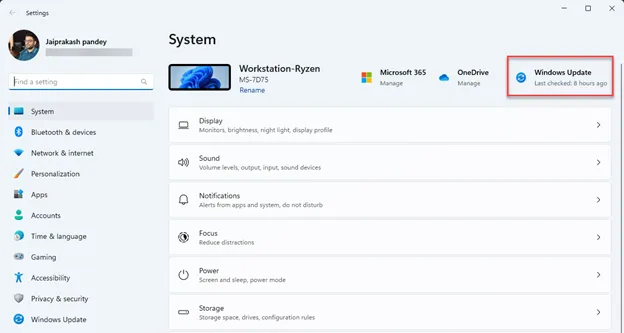
Now click on check for updates then download and install all the updates suggested by windows.
So, that was all about speeding up your PC to fix slow AutoCAD.
Now let's talk about speeding up AutoCAD software itself.
As the drawing size increases the performance of AutoCAD will also start to suffer.
So, the larger the data sets more is the optimization needed to keep AutoCAD working smoothly.
So here are the tips that will help you improve the performance of AutoCAD directly.
Set up hardware acceleration
Without hardware acceleration, AutoCAD won’t allocate tasks that are going to run efficiently on specific hardware and will use the processor for most of the work.
Once you activate hardware acceleration AutoCAD will allocate the task that needs GPU to GPU and other tasks to other system resources making room for calculations in the processor.
This as you can see will improve the performance of AutoCAD significantly.
To activate hardware acceleration open AutoCAD and type the 3DCONFIG command and press enter.
Then click to activate the hardware acceleration toggle as shown in the following image.
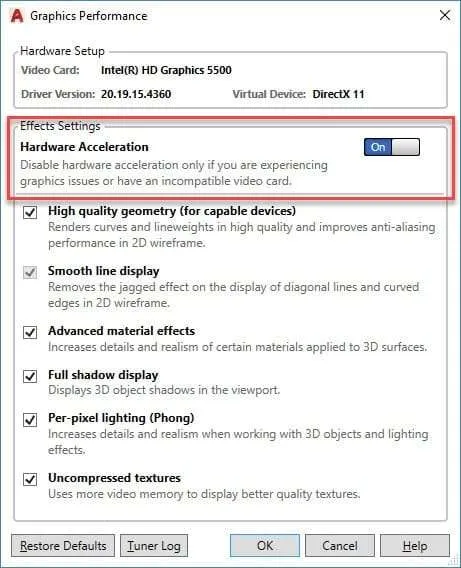
If it is already ON don’t deactivate it just keep it active and close the “Graphics performance” window.
Freeze unused layers
This tip is especially helpful for larger drawings containing several objects and data types.
So, if your drawing regeneration time is longer or your cursor is jumping when working with the drawing then simply freeze the layers that you are not using.
To freeze the layers type LAYFRZ and press enter then click on the object from your drawing that you want to freeze and the layer containing that object will freeze.
Repeat this for several layers and soon you will have a lightweight drawing and visible performance improvement.
Freezing the layer will essentially tell AutoCAD to ignore all objects that are on that layer when regenerating the drawing and this will work as if objects of the frozen layer don’t even exist.
You can always unfreeze the layer when you are done working with your drawing using the command LAYTHW.
Keep only required drawing tabs open
This may seem like a trivial thing, but it can impact the performance of your system significantly.
When working with AutoCAD just ensure you are only opening the drawing you need to work with.
If you keep several tabs open, then AutoCAD will be forced to keep these files available for you in the system memory making things slower for you.
Remove third-party plugins
If you are using plugins to speed up your workflow, then chances are you might have installed several of these plugins over time and now most of them are hardly, if ever, used.
So, it’s better to remove the plugins that you don’t use anymore to gain an extra performance boost.
To remove the plugins go to the add-ins tab and select the App manager icon as shown in the following image.
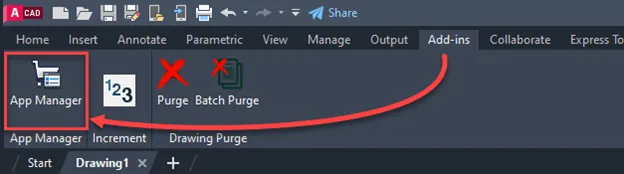
Now select the app that you want to remove from the list and then right-click on it and select Uninstall.
This will remove the app from AutoCAD, and it will eventually make your software lighter and improve its performance.
Clean AutoCAD drawings
When drawings are older or when they use several references and data links they tend to accumulate a lot of redundant data types as well.
This bloats up your drawing file for no reason at all and this eventually impacts the performance of AutoCAD.
To speed up the performance keep your drawing clean and you can do that using the PURGE command.
Type PURGE and press enter key.
Now select all the extra objects that you want to remove from the list as shown in the following image.
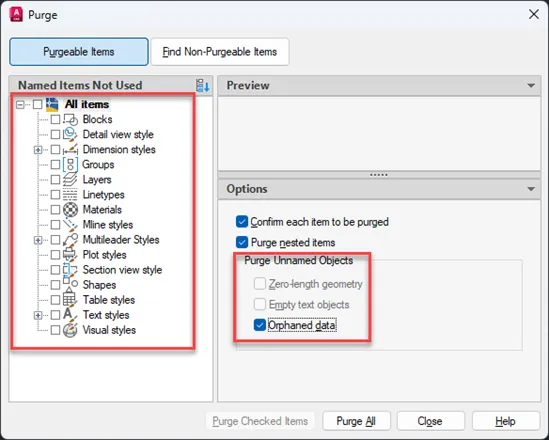
Also make sure you check the boxes under the “Purge unnamed Objects” box like Zero-length geometry, empty text objects, and Orphaned data.
All of these options may not be active for all the drawings but if it is active for your drawing then you can check these boxes.
Click “Purge all” after making the selection and that should clean your drawing.
Save the new drawing and for the sake of comparison you can even compare the size of purged and original drawing files and you will notice a big difference if your file is large and old.
There are also some plugins and other tools that you can use to clean AutoCAD drawings.
Changing some system variables
There are some system variables especially the ones related to the display settings of the drawing that can improve the performance of AutoCAD if deactivated.
For reference, you can type SELECTIONPREVIEW press enter key then type 0, and press the enter key again.
This will disable the preview of objects that are highlighted when you hover your cursor over these objects.
The default value of this system variable is 3.
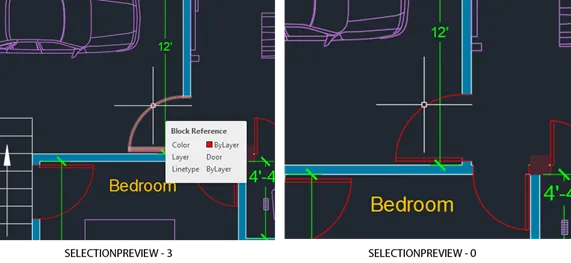
Another system variable that you can deactivate is Dynamic input mode.
Type DYNMODE and press enter key.
If it is active its current value will show up as 3 change that value to 0 and press enter again.
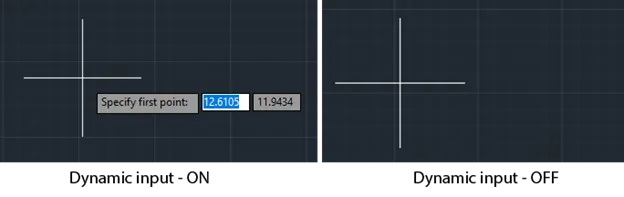
This will deactivate the dynamic input which shows up next to the cursor when you select a command.
This in turn will also improve the performance of AutoCAD.
Update AutoCAD
This goes without saying that you should keep your software always up to date.
This ensures the stability of performance, and it keeps bugs out of your software.
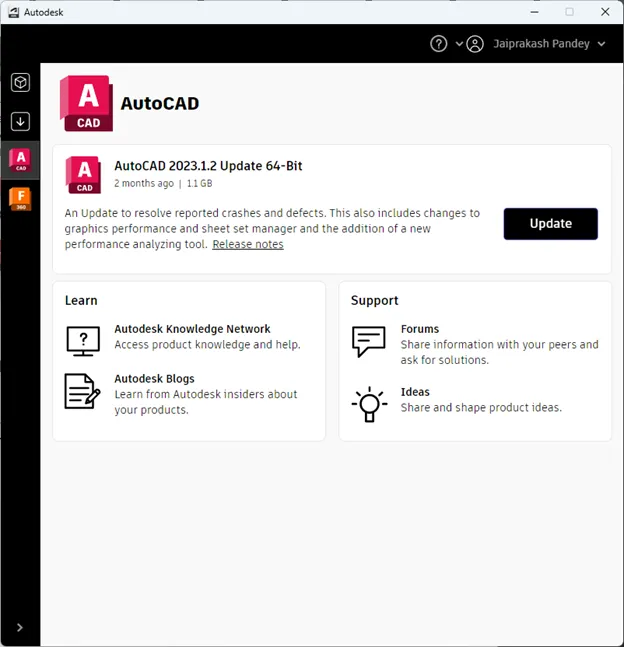
To update AutoCAD select “Autodesk desktop app” from the system tray as shown in the following image and select the AutoCAD tab from the window that shows up.
Click on the update button next to all the updates related to AutoCAD and it will automatically update your software.
Some FAQ's
Okay now let's answer some of the frequently asked questions of our users related to improving slow AutoCAD.
How do I reduce RAM usage in AutoCAD?
The best method is to create more room in RAM by closing programs that take up too much RAM space like Google Chrome and other tools.
Also make sure your unnecessary startup apps are disabled as explained in the article above.
This will eventually free up even more RAM space.
How do I fix AutoCAD hanging?
The biggest culprit here can be RAM, so check the task manager and see if your RAM usage is maxed out at 100%.
If it is then add more RAM sticks to your machine.
Also check which other hardware is creating a bottleneck as explained in the article above and upgrade that hardware.
How much RAM do I need for AutoCAD?
I would recommend you go with at least 8 GB of RAM (though 4 GB will work as well but it will be very slow).
For the best AutoCAD laptop performance I would suggest you go with at least 16 GB of RAM.
Summary
As you can see speeding up AutoCAD is a two-step process and it involves speeding up your PC and then the software itself.
If all else fails then the only logical next step is upgrading your PC or laptop with better hardware.
Did these tips help improve the performance of AutoCAD in your case? Let me know in the comments below.