How to export high resolution images from AutoCAD drawings
If you need to export high resolution images from AutoCAD drawings for presentation or printing purposes then this tip is for you. You need to configure plotter and paper settings for high resolution plot in AutoCAD, these settings are saved locally on the PC and they are not file dependent. Configuring plotter To configure plotter [ ]
If you need to export high resolution images from AutoCAD drawings for presentation or printing purposes then this tip is for you.
You need to configure plotter and paper settings for high resolution plot in AutoCAD, these settings are saved locally on the PC and they are not file dependent.
Configuring plotter
To configure plotter type PLOTTERMANAGER on the command line and press enter.
From Plotters window double click on Add-A-Plotter Wizard.
Click Next in the wizard then select My Computer radio button from next page of the wizard and click Next again.
From Plotter Model page select Raster file formats from manufacturers panel and TIFF version 6 (uncompressed) from models list.
You can select other options also from Models panel like PNG and BMP but TIFF format will preserve layer data and other information as well in the image.
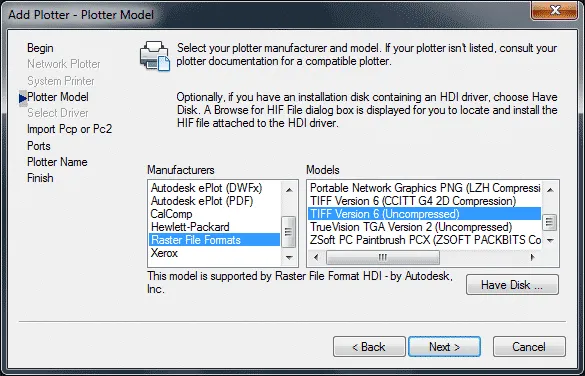
Click on Next twice and select Plot to File radio button if prompted.
Assign any name to your custom plotter, for this example, I am naming it as Custom Plotter.
Click on Next button after assigning a name to the plotter.
Click on Edit Plotter Configuration button from finish page of the wizard, this will open Plotter Configuration Editor for our custom plotter.

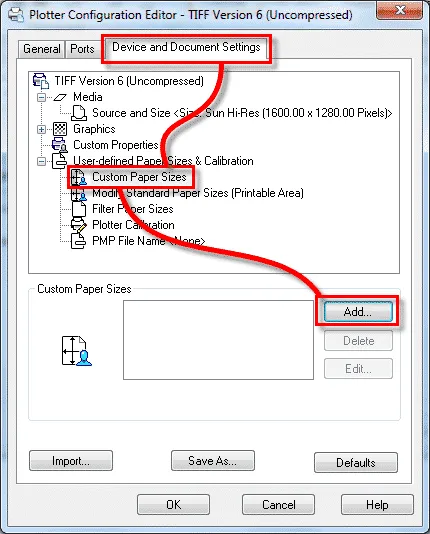
Click on Device and Document Settings tab on this Plotter Configuration Editor window and expand User defined Paper Sizes & Calibration option.
Then select Custom Paper Sizes then click on Add button to define new paper size, see the image below for reference.
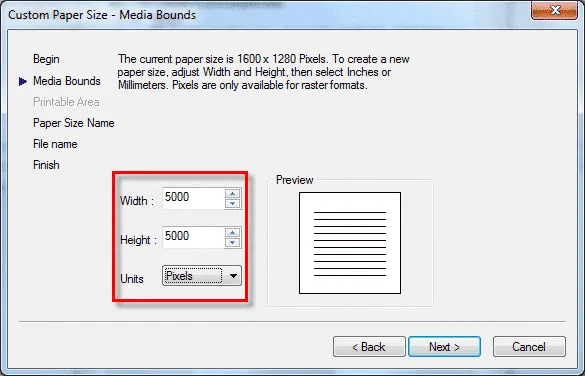
A new Custom Paper Size wizard will open, click Next button on the first page of this wizard.
From Media Bounds page of the wizard enter 5000 in width and height fields as shown in the image below and click Next.
Assign a name to the paper and keep all other settings at their default.
For our example, I am naming it as Custom Size 5000 PX.
Click on the finish button to close the Custom Paper Size wizard and also close all open windows.
Now our plotter is fully configured for high-resolution plotting.
Plotting in High resolution
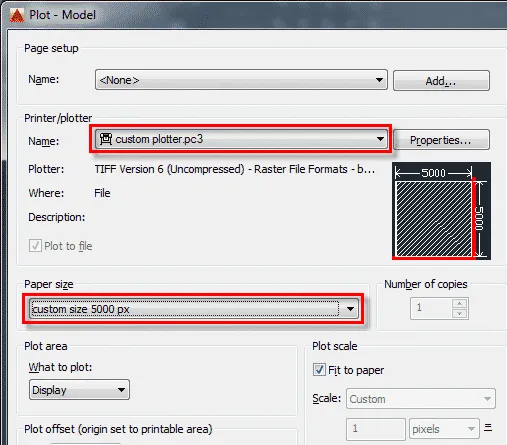
Type PLOT on the command line and press enter this will open plot window.
From this window select Custom Plotter.pc3 from printer/plotter drop down menu and select Custom Size 5000 px from Paper size drop down menu.
Assign plot area and other settings and hit the OK button.
This will make a high resolution TIFF image and its size may be very large compared to general image files.
Summary
You may not always need high resolution images from AutoCAD as PDF will do just fine in most cases.
But whenever you do, you can use the methods mentioned in this article to get high resolution image from AutoCAD.
If you have questions related to this article let me know in the comment section down below.