How to modify Quick Properties in AutoCAD
Whether or not you are a regular user it is most likely that you have come across the Quick Properties in AutoCAD at some point. Over the years it has developed a name for being that “annoying box”. In earlier versions of AutoCAD, it tended to inconveniently pop out next to the cursor when you [ ]
Whether or not you are a regular user it is most likely that you have come across the Quick Properties in AutoCAD at some point.
Over the years it has developed a name for being that “annoying box”.
In earlier versions of AutoCAD, it tended to inconveniently pop out next to the cursor when you selected an object in your AutoCAD drawing.
In more recent versions it has been criticized for being hard to find.
Sadly many users now completely avoid the Quick Properties palette.
However, this could be at the cost of productivity as the highly customizable Quick Properties palette offers a number of benefits over it’s much more trusted though less smart counterpart the Properties palette.
For example, the Quick Properties palette, unlike the Properties palette, can be modified to.
Alter its location and appearance.
Show only the properties you are interested in.
Appear only in certain given circumstances.
This article aims to cover each of these examples.
So if you are tired of repeatedly navigating the plethora of ribbons and menus AutoCAD offers only to edit the same old property.
Or if you find it tiresome to look through the entire surplus properties included in the standard Properties palette, this article could increase your knowledge and appreciation of the much maligned Quick Properties palette and make life easier.
Modify the Location of Quick Properties
As mentioned the Quick Properties palette is often criticized, either for being hard to find and not appearing or for inconveniently appearing when it is not needed.
This most likely depends on the version of AutoCAD you are using.
Earlier versions of the software tend to attract the former criticisms while recent versions tend to attract the latter.
To enable or disable the Quick Properties palette, enter command QPMODE within the command line and hit enter or use shortcut CTRL + SHIFT + P.
In the command line you will be prompted to enter a new value.

Note the value you enter dictates whether the Quick Properties palette appears or not when an object is selected.
Enter 0 to disable the Quick Properties palette, or 1 to enable the Quick Properties palette.
By default within more recent versions of AutoCAD, this will be set to an initial value of -1, meaning the feature is turned off but values are kept.
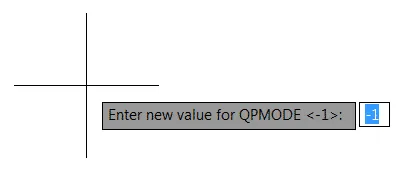
Note there is also an additional option to enter a value of 2, which enables the Quick Properties palette to appear but only when the object selected is supported within CUI editor.
This is something we will explore in the final section of this article.
Assuming you are reading this article because you wanted to enable the Quick Properties palette, and unlock some of its mystical features you should have now entered a value of 1 when prompted by the QPMODE command.
Meaning when you select an object within drawing mode the Quick Properties palette appears.
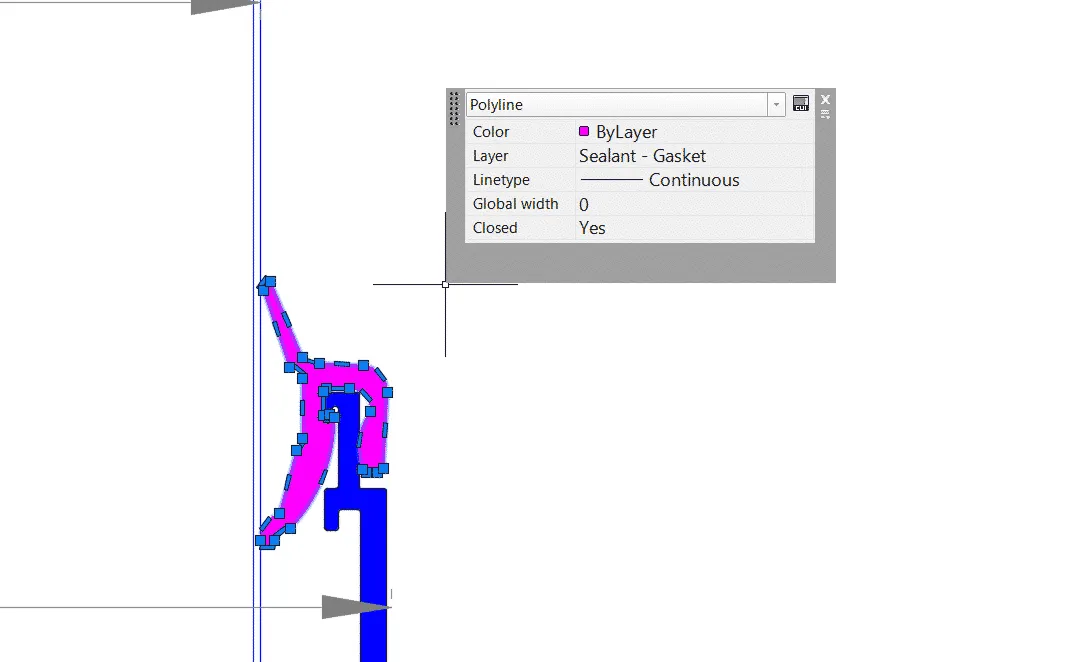
To change the location of where the Quick Properties palette appears, click the Options button (located beneath the Close button of the Quick Properties palette) and select Settings from the drop-down menu.
This will open the Drafting Settings window.
Within the Palette Location panel of the Drafting Settings window, there is the option to set the location as Cursor-dependent or Static.
Note in recent versions of AutoCAD this will be set by default to Cursor-dependent with the Quadrant option set to Top-Right and a Distance in Pixels value of 50.
You can change the location where the Quick Properties palette appears relative to the cursor using the cursor-dependent option.
Alternatively, select Static meaning the location of Quick Properties palette will always remain in the same place no matter which object is selected just like standard Properties palette which can be placed anywhere in the drawing area.
Make a selection based on your needs and click the OK button to apply changes.
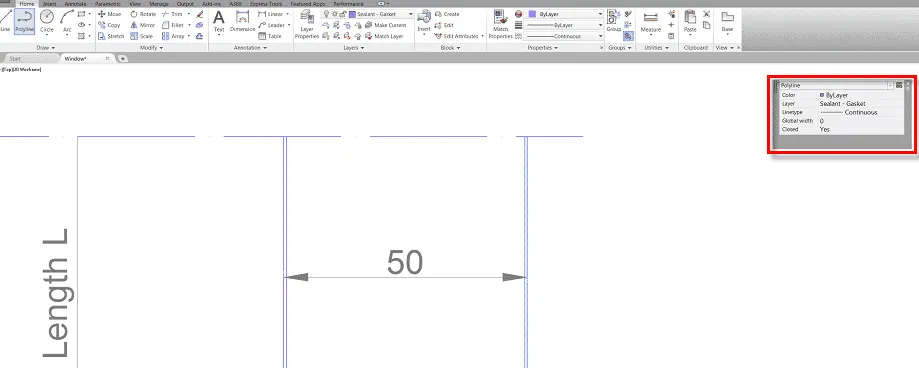
To change the location of quick properties palette click and hold the handle at the top left of the palette and drag and drop at the required location.
Choose What Quick Properties to Display
The Quick Properties palette is perhaps one of the most customizable menus within AutoCAD, the ability to make modifications to it extends much farther than simply modifying how its location settings perform.
To truly increase productivity by modifying its settings you must also understand how to have it show or hide the properties you want it to.
To turn on/off properties displayed within the Quick Properties palette first click on the Customize button (located alongside the Close button of the Quick Properties palette).
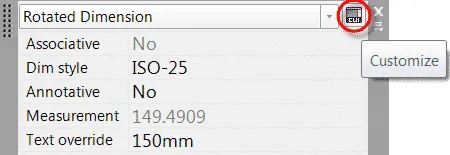
Note if you cannot find the Customize button enter CUI on the command line.
Be sure that the Quick Properties palette is open when you do so.
This should open the Customize User Interface (CUI) window aka CUI editor.
From the CUI editor, you can select the properties you want to appear in the Quick Properties palette these properties are organized by object type.
To turn on/off a single property click the checkbox of the required property, or to turn on/off a group of properties click the checkbox of the category.
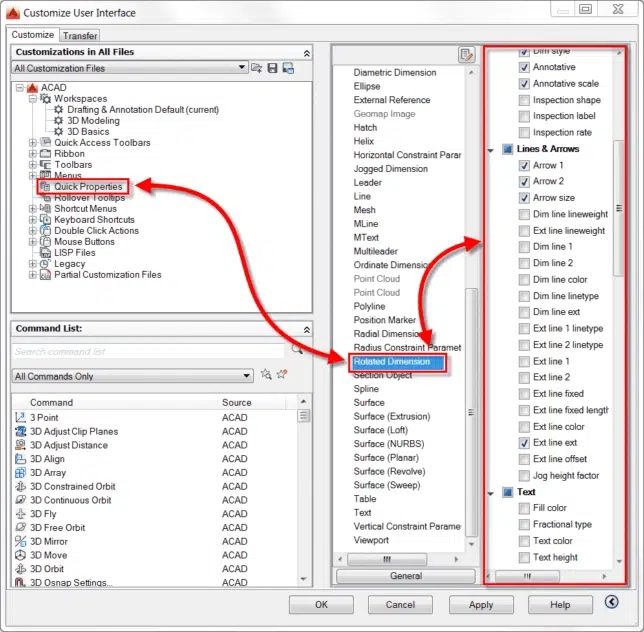
An example of a group of properties that you may want to turn on is the Lines & Arrows properties of the Rotated Dimensions object type as shown in the image below.
This makes properties related to the selected dimension visible in the Quick Properties palette.
Make sure not to include too many properties to the quick property palette else it will lose its importance and it may become overcrowded like the standard properties palette.
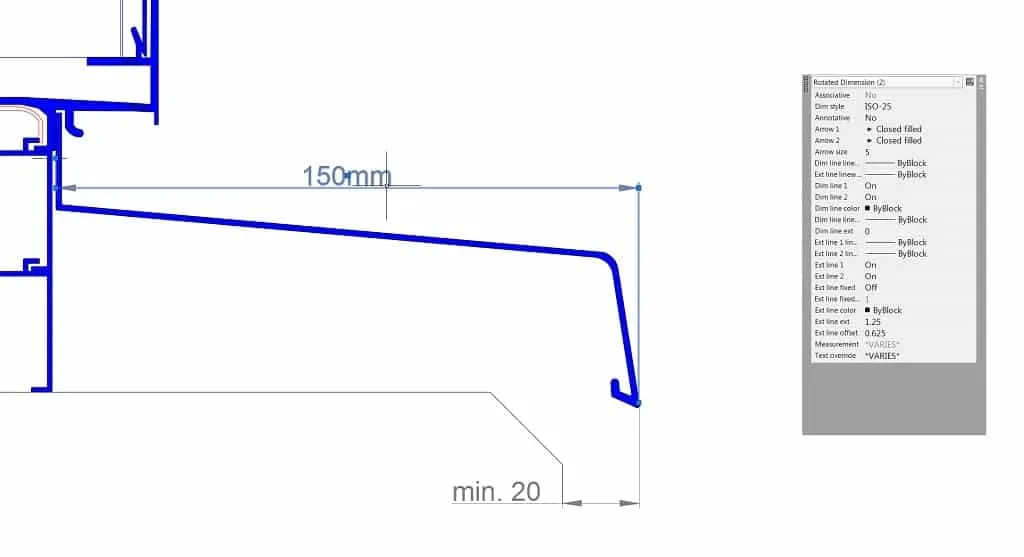
When you have finished selecting the properties you want to display within the Quick Properties palette, click the Apply button to apply the changes then select the OK button to exit the CUI editor.
Choose the Circumstances for Quick Properties to Appear
As touched upon in the previous section of this article it is possible to have the Quick Properties palette appear only when certain types of objects are selected.
To select what circumstances the Quick Properties palette should appear in or more specifically what object type should prompt the Quick Properties palette to appear change the value of QPMODE system variable to 2.
To do this type the command QPMODE and hit enter or use shortcut CTRL+SHIFT+P then enter a value of 2 as prompted.
As explained previously, entering a value of 2 enables the Quick Properties palette to appear when object types enabled within the CUI editor are selected.
To turn on/off object types within the CUI editor, click the Customize button next to the Close button of the Quick Properties palette.
Alternatively enter the command CUI, with the Quick Properties palette open.
In the Customize User Interface (CUI) window aka CUI editor, click the Edit Object Type List button and check the box of the object types you would like to trigger the Quick Properties palette.
Apply the changes by clicking OK in the Edit Object Type List and remember to click the Apply button before exiting the CUI editor.
An example of why you may want to modify your Quick Properties palette to react like this could be at times when you only want to have Quick Properties show when you click, for example, a Rotated Dimension.
You could have QPMODE 2 set up to react in this way, and if you want to change back simply go back to QPMODE 1.
Summary
The Quick Properties feature of AutoCAD has received a lot of negative comments over the years.
However, it is highly customizable and when customized to suit your needs a number of efficiencies can be achieved in the drawing process.
Do you have questions related to this article? let me know in the comments below.