Our collection of 31 best Revit tips and tricks
In recent years, Autodesk Revit has become the most common BIM software among architects, engineers, and construction professionals for designing, documenting, and constructing structures. Whether you re working on Architectural, Structural, MEP or General design projects, mastering Revit can significantly enhance your efficiency. So, to make you even more efficient we have created a collection of [ ]
In recent years, Autodesk Revit has become the most common BIM software among architects, engineers, and construction professionals for designing, documenting, and constructing structures.
Whether you’re working on Architectural, Structural, MEP or General design projects, mastering Revit can significantly enhance your efficiency.
So, to make you even more efficient we have created a collection of our top Revit tips and tricks that you should try.
Revit Architecture tips
Let’s start with Revit architecture tips.
Tip 1: Working with multiple views
You can create multiple views in a single window to see how the design looks from different perspectives.
For example, if you are preparing a plan view of your design, it will be helpful if you could see how the drawing looks in 3D isometric view.
This will allow you to fix any issues in real time.
To get multiple views type WT and press enter key to tile the window and type ZA to zoom all.
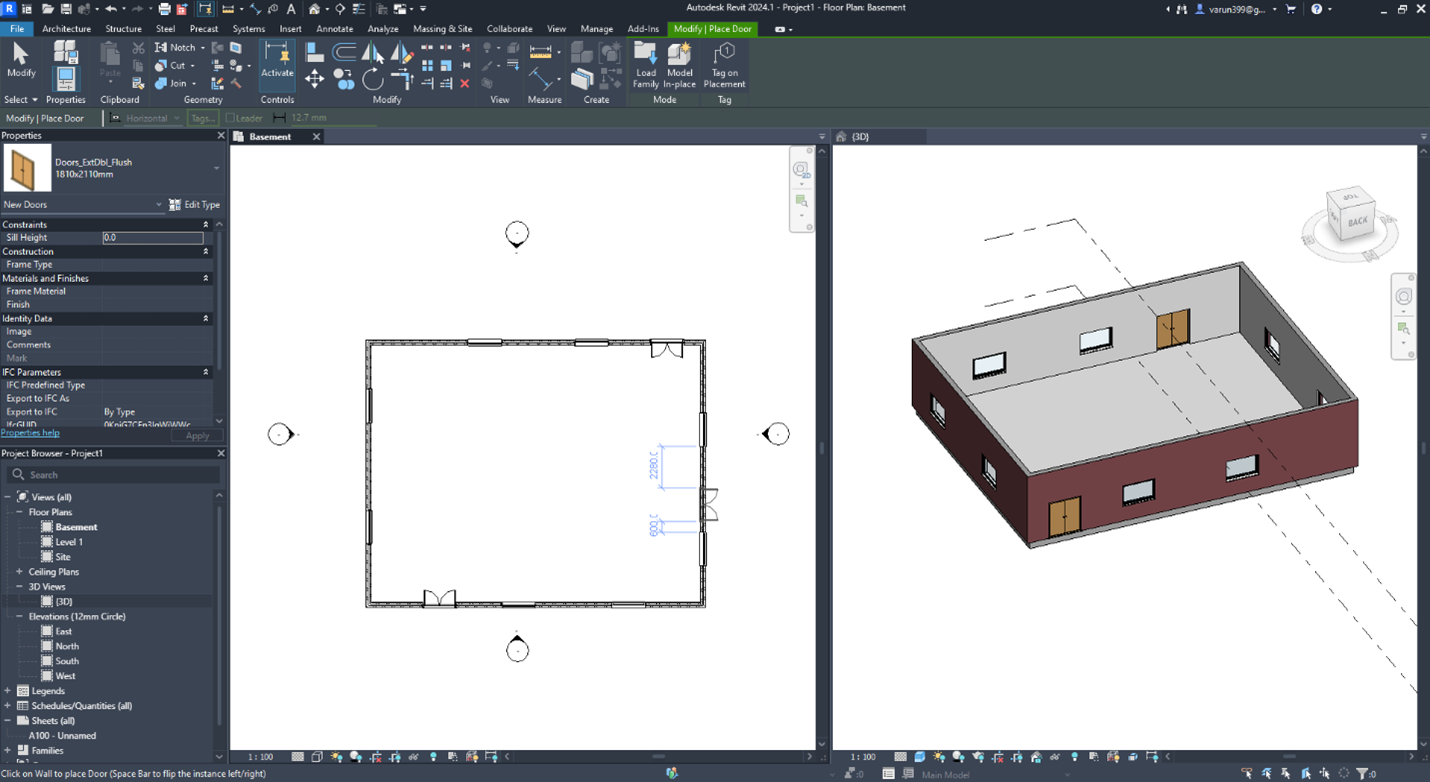
The tiled view will look like the image shown above.
Tip 2: Use pin to lock the drawing
As you build the design, the drawing will become more and more complex.
Due to this complexity, it is easy to unknowingly move any object from the drawing which may cost you time and money down the road.
So, you can avoid this issue by locking your drawing.