How to make and modify AutoCAD blocks Complete tutorial
AutoCAD Blocks are symbols like chairs, furniture, doors, etc. that you often see in regular AutoCAD drawings. These objects can be reused in several drawings and can even be transferred from one drawing to another. Because of this property they are often called reusable objects. So, in this article, we will explore the step-by-step method [ ]
AutoCAD Blocks are symbols like chairs, furniture, doors, etc. that you often see in regular AutoCAD drawings.
These objects can be reused in several drawings and can even be transferred from one drawing to another.
Because of this property they are often called reusable objects.
So, in this article, we will explore the step-by-step method of making blocks in AutoCAD.
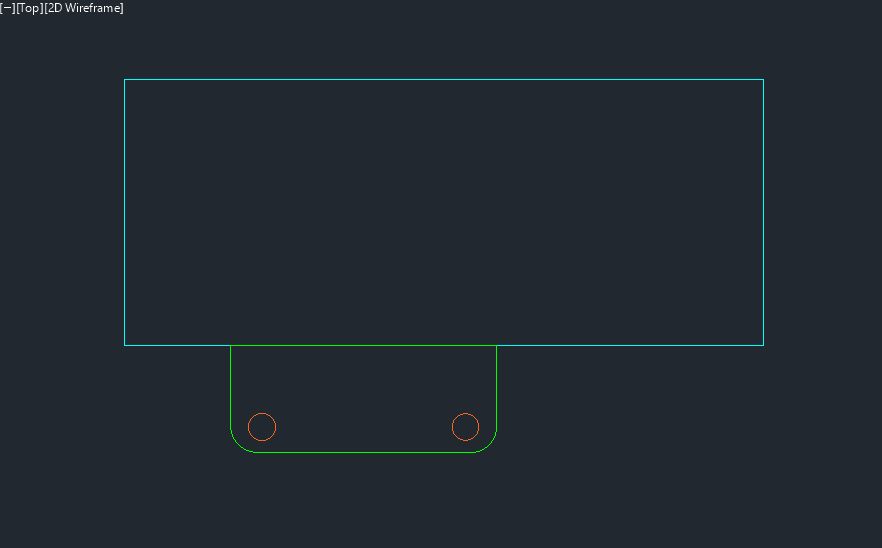
For this example, I will create a block that looks like the following image.
Creating Simple Blocks in AutoCAD
Start by launching AutoCAD, then open an existing drawing or start a new template.
After you have your drawing open, you can start by making the general shape of the furniture block using simple draw and modify commands.
For our example here units are irrelevant so you can use whatever unit you want.
Bu to keep things simple I am using metric or mm as the unit.
For a basic desk, you might use rectangles and lines to outline the tabletop and legs.
The "Line", "Circle,” and "Rectangle" commands will be particularly useful here.
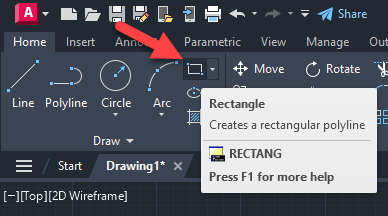
Click on the Rectangle command of Home tab to begin drawing your rectangle.
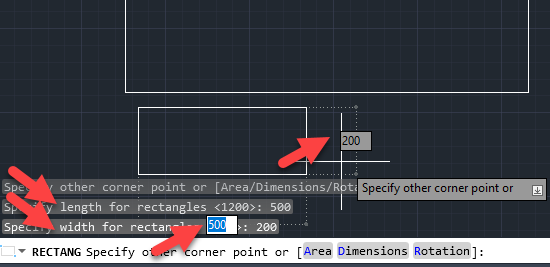
At the command line, you will find different options; select "D,” representing dimension, and specify the length as 1200 and the width as 500, as indicated below.
Again using the “Rectangle” command and following the above process, create a representation of a chair of length 500 and width 200 as shown in the following image.
Then, using the “Move” command under the Modify tab, move the smaller rectangle, which represents the chair, to touch the table.
Also ensure the chair is placed about 200 mm from the bottom left corner of your rectangle, as indicated below.
You can key in 200 units on your keyboard to move precisely.
Then, using the “Circle” command, under the Draw tab, create a circle of radius 25 mm within your workspace.
Move it inside your chair area and mirror it to the opposite side as shown below.
You can make the chair look a bit more realistic by using the “Fillet” command.
Type F and press enter to start the fillet command or select the fillet tool from the modify panel of Home tab.
Select Radius from the subcommands and then type in the radius of 50 for the corners.
Cow click on the lines that make the corner and a circular fillet of 50 will be applied to it.
You can press the Enter key to repeat the same command and apply the fillet on other corners as well.
After all these modifications this is how my block drawing looked like.
After finishing making the drawing for the block navigate to the "Block" command in the Insert tab of the Ribbon in the "Block" panel, or in the command line, type B and hit Enter.
A Block definition dialogue box will open up.
Enter a name for your block in the "Name" section of the "Block Definition" dialogue box.
You can name your new block whatever you like, in our case, I am naming it "Desk”.
In the future, we will refer to the block by this name.
Click on the “pick point” option in the base point section of the block definition dialogue box.
Then click at a point in your drawing to mark it as a base point.
In our example I am selecting the top left corner of the drawing as base point.
This is important when you use the block in other designs as the block is added in the drawing with respect to the base point that you will set here.
Now click the select objects option from the “objects panel” of the Block definition dialogue box and then select all the objects that we made earlier as part of our example block.
When doing so I am also checking the option “convert to block” from the radio buttons under Objects panel as shown in the following image.
Check the “Allow Exploding” and uncheck all the other checkboxes.
Also, ensure that the “Open in Block Editor” checkbox in the lower-left corner of the Block Definition window is unchecked.
Once your block settings have been established, click "OK" in the "Block Definition" dialogue box.
And now we have a block called Desk in our local block library.
Inserting blocks in AutoCAD
The block we created in the steps above can be inserted in the drawing using the Insert option of the Block panel of Home tab.
When you click the Insert tool a preview of all blocks available in the current drawing will show up as shown in the following image.
Click on the block that you want to insert in the drawing and then click at a point where you want to add the base point of the block.
The block will be added at the point where you click in the drawing area.
You can also insert the blocks with more options using the options panel of the Blocks palette.
So, let's now explore the blocks palette and its options.
You can open the block palette by selecting any option i.e. Recent blocks, Favorite blocks or Blocks from libraries option as shown in the image above.
The Blocks panel will appear, with four tabs Current Drawing, Recent, Favorites and Libraries as shown in the following image.
All of the blocks in the current drawing are displayed in the “Current drawing” tab of the palette.
Click on a block in this panel, then click on the drawing area to insert it.
With the cursor over the block's base point, it will be added.
Additionally, blocks can be moved from the preview area to the drawing area by dragging and dropping them as shown in the following animation.
The Recent tab will display all of the recently added, edited, or created blocks from all the drawings that you have recently worked with.
You can use this as a filter to narrow down the large list of blocks and find the ones you've recently used.
If you mark any block as Favorite, then it will show up in the Favorite tab.
You can mark any block as Favorite by right clicking on the block and selecting the “copy to favorite” option.
To copy a block to favorite from the Current drawing tab you need to ensure that your current drawing is saved.
Finally, the libraries tab will show all the blocks from your custom folders or locations that you have added in the libraries tab.
There is an Options panel under every tab of the Blocks palette.
Let’s now talk about the options available in this panel.
Insertion Point
Check this option if you want to specify on your workspace where exactly you want to place your block.
Otherwise, uncheck it and enter the coordinate values of the block's insertion point in the X, Y, and Z fields.
Scale
Make sure this option is selected if you wish to adjust the block's size on the screen.
If not, uncheck this box and use the X, Y, and Z columns to set the scale.
Block sizes along the X, Y, and Z axes will vary independently when the scale is adjusted in different directions.
Additionally, if you wish to maintain the same item size across all scales, click the Scale option, choose Uniform Scale from the menu, and then enter the uniform scale value in the following area.
Rotation
Check this option if you want to change the rotation of the block in the drawing area.
Repeat Placement
If you check this option, the block insert command will still remain available after inserting the first block, and you will be able to insert as many block instances as you like.
Use the Esc key to end the repeat placement.
Explode
Keep the Explode option selected if you wish to insert a block as a straightforward drawing entity rather than as a block reference.
This will place the block in the drawing and then explode it to convert it into regular drawing objects.
Modifying blocks
Now that you know how to make a new block let’s talk about modifying an AutoCAD block.
The biggest advantage of using block is its linked nature.
So, if you modify one block reference it will modify all the references of that block in the drawing.
As an example, if you use a block 100 times in a drawing and modify just one of its references then all 99 other references will automatically update.
Now, to explain this feature I will use the desk block that we made in the previous example.
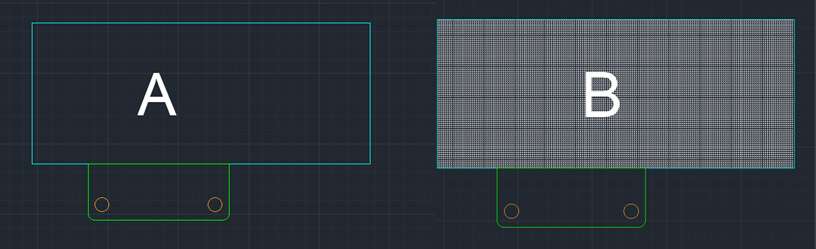
The desk block we used had a simple rectangle for the table and chair, as well as circles for the chair's legs, as illustrated in drawing A in the figure below.
We want the block to transform into the one shown in drawing B, complete with hatching to reveal more table details.
If the block is not available in the drawing area insert the "Sample Desk" block into the drawing from Insert block palette.
Double-click on this block, then click “Ok” after selecting its name from the Edit Block Definition window that appears.
The block will open in the block editor environment where we can modify it.
Alternatively
You can right click on the block and then select the "Open in block editor" option or select "Edit block In-place" to modify the block directly in the main drawing area.
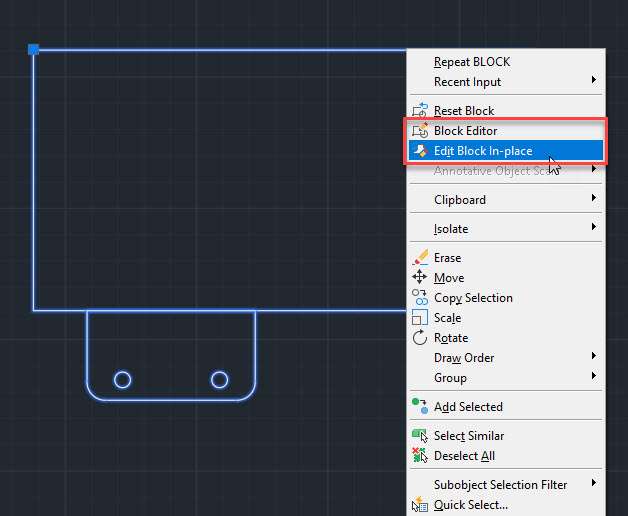
The block will now open in the block editor window (or in the main drawing area with editing mode if you selected "Edit block In-place" option) where it will behave like a typical drawing object.
You can recognize the block editor by its grey colored background and a new “Block editor” tab.
In the block editor you can make modifications to the block using the drawing and modify tools of the Home tab.
In our case we will add a hatch pattern in the table part of the drawing.
After adding the hatch pattern, click the "Close Block Editor" checkmark at the right side of the block editor panel, and then select Save the changes from the popup notice.
This will take you back to the regular AutoCAD model space and all the references of the block will update and all the references of the block will have the hatch pattern as well.
How to Rename blocks in AutoCAD
You might have noticed that so far there are no direct options for renaming a block in the Blocks palette or Block editor.
This is because we have a dedicated command for this.
So, to rename a block in AutoCAD (or even other named objects like layers, linetypes, views etc) then you can use RENAME command.
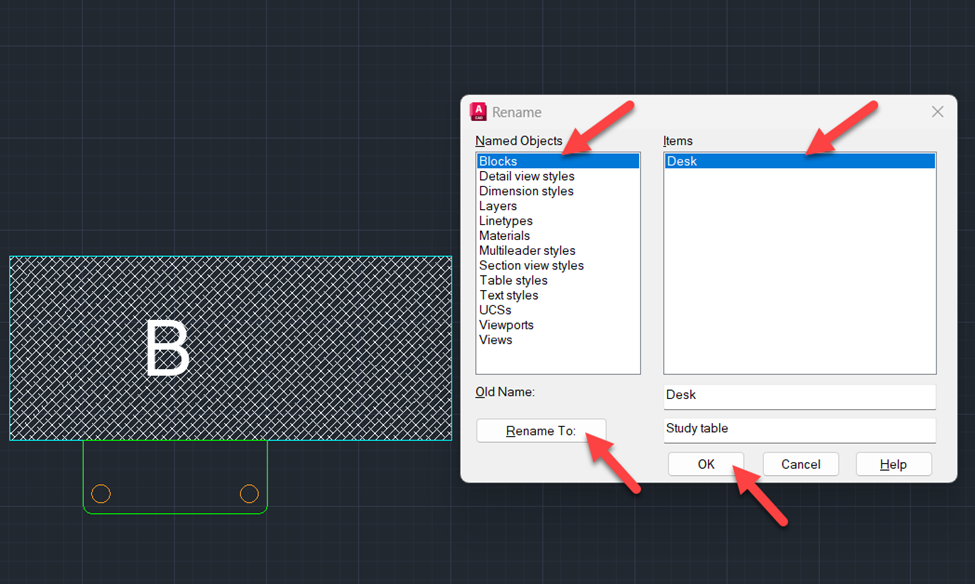
In your drawing, use the command line's any type in the “RENAME” command, and a pop-up window will appear.
From the “Rename” window, select Block, and under that, a list of the present blocks with your drawing will be shown.
From the item list, click on the block you want to rename, and at the bottom of the window, you will see the old name and an option of a new name.
For this, we will change our block from “Desk” to “Study table” and click on OK as shown in the following image.
Redefine Block in AutoCAD
Let's consider a situation where we created this Desk block and added them in our drawing.
Now we have more than 100 references of this Desk block in our drawing but we now want to modify the shape of this block and we don't want to create a new block and we certainly don't want to add more than 100 references again.
This is the exact scenario where Redefine block can help you.
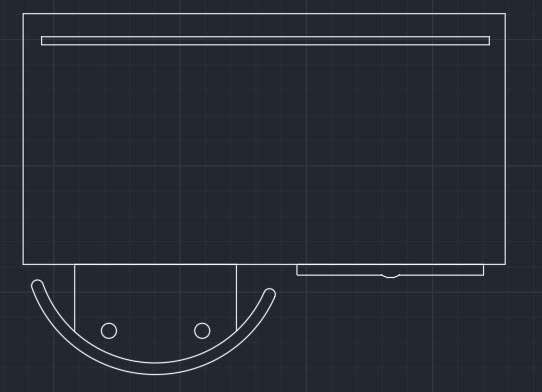
So, let's learn how we can use Redefine block to replace the block "Study table" (formerly named Desk) with the block shown below.
After making the block that you want to use as replacement go to create block option on the home tab Blocks panel or type B and press enter.
Now the Block Definition window will open up.
Type the exact same name for this new block that you already have.
In our case the name of block is "Study table" so I will use same name "Study table" for this block as well.
Click the "Pick point" from the Base point panel and then click the top left corner of the new table block.
We are selecting the same base point as the original block to ensure that new blocks stay in the same place because for the replacement blocks the base points overlap.
Now click on the "Select objects" option of the Objects panel.
Make sure Retain is selected from the three radio buttons in the Objects panel.
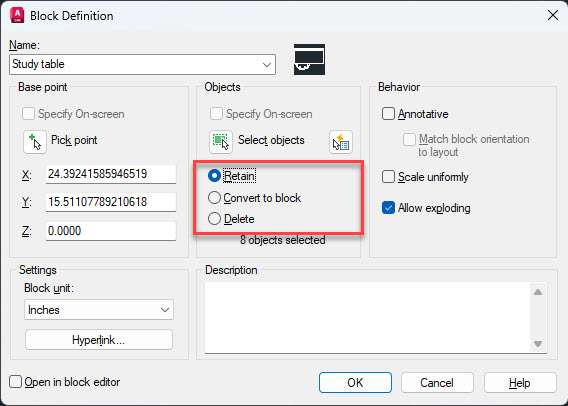
This will ensure that your current drawing (new block that we created as replacement) is retained as it is but all existing references will be still converted as per this new block drawing.
If you select Delete from this option then the current reference of the new block drawing will be deleted from the screen but all the existing references will still be updated as per new replacement block drawing.
Selecting the "Convert to block" option here will convert the new block drawing also into a block reference.
Finally make sure Annotative option, Open in block editor and Scale uniformly options are not checked and Allow exploding option is checked.
Then click the OK button and a new Redefine block warning will show up.
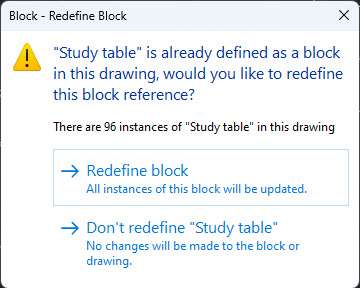
This will basically tell you that several blocks of same name exist in the drawing and if you go ahead then all those blocks will be redefined with this new block.
Click the "Redefine Block" option and all the blocks are now redefined and they will take the shape of newly created block.
Frequently asked question
So, now you know about making and modifying blocks in AutoCAD, let's answer some of the questions that you might have.
Where can I find free CAD blocks?
Free CAD bocks are available in the design center tool of AutoCAD and you can also get them from online block libraries.
You can download these AutoCAD blocks from online libraries and use them in your drawings.
How many types of block are there in AutoCAD?
In AutoCAD there are mainly 4 types of blocks, these are simple blocks, xRef block, layout block and the dynamic block.
How to convert a block into normal object?
To convert a block into normal drawing entity you need to explode it.
Type X press enter then select the block you want to convert into normal objects and then press enter again.
The block is now converted into a normal object.
If at the time of making a block "Allow exploding" check box is not selected then that kind of block can't be exploded.
Summary
So that was all about making, inserting and modifying blocks in AutoCAD.
There is quite a lot a lot about blocks that you can learn in the reusing existing content section of the AutoCAD beginners course.
If you found this article helpful or you have anything to add to the article then let me know in the comments down below.