Extrude and Presspull command in AutoCAD, 8 tips
Extrude and Presspull Command in AutoCAD are probably the most used 3D tools. So to help you make better use of these commands I have compiled a list of 8 of my best tips that you can include in your workflow. Changing 3D mode There are two modes available with the Extrude command, these are [ ]
Extrude and Presspull Command in AutoCAD are probably the most used 3D tools.
So to help you make better use of these commands I have compiled a list of 8 of my best tips that you can include in your workflow.
Changing 3D mode
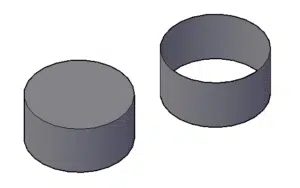
There are two modes available with the Extrude command, these are Solid and Surface.
You can convert any closed geometry into a solid or a surface by selecting the respective mode from the command line as shown in the image below.

If you apply extrude command on an open 2D geometry a surface will always be created irrespective of the mode selected.
Extrude command can be used on Regions too, and you will be able to select Solid or surface mode for Regions also.
Extrude along direction
By default, extrusion will go perpendicular to profile but by using direction option from the command line we can change the direction of extrusion to an angle other than 90 degrees.